

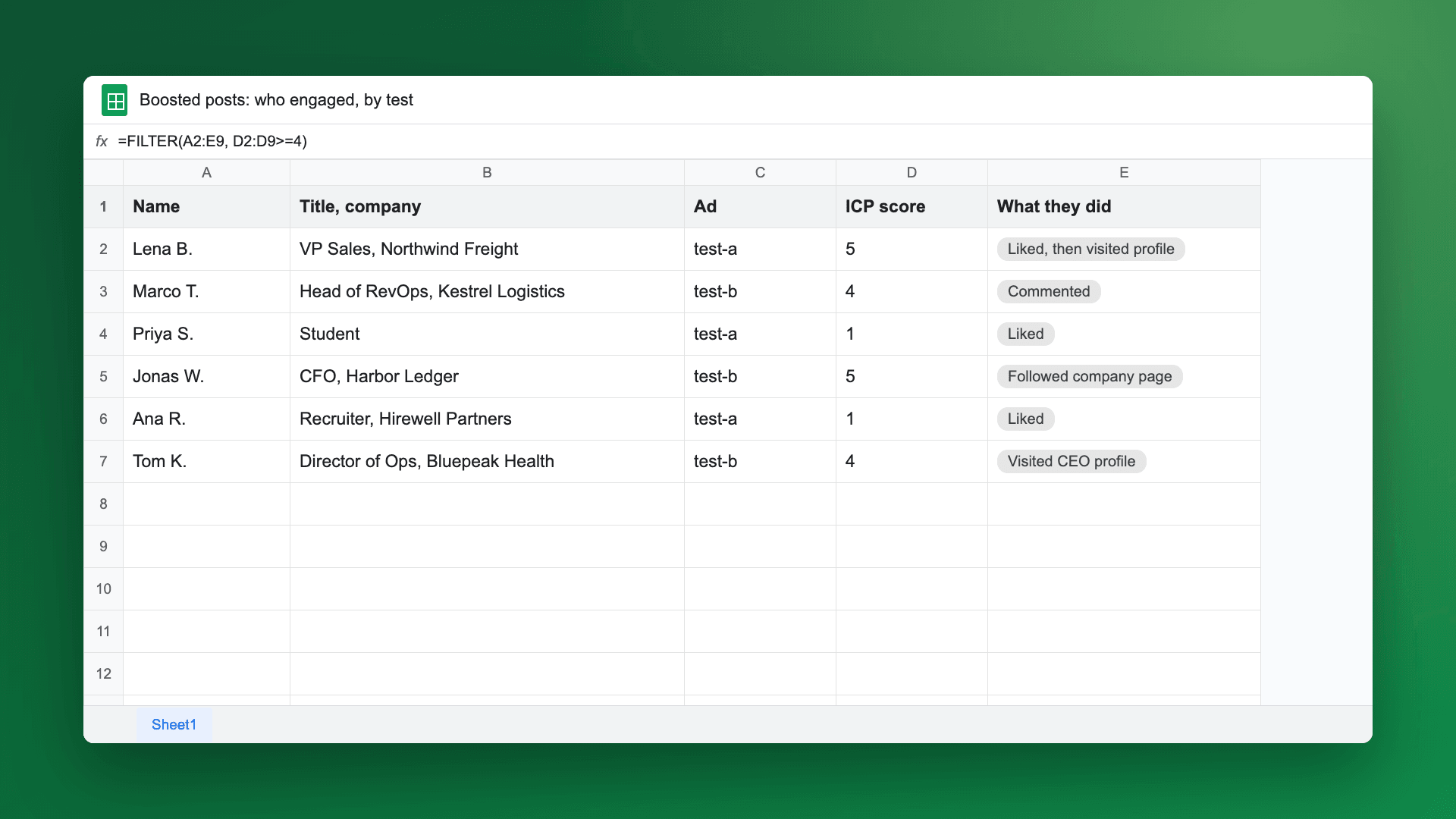
Short answer: Campaign Manager reports how your thought leader ad performed and shows who engaged in groups: by company, job title, seniority, industry and location, with small numbers hidden. To see the actual people, track the ad's post in a tool that collects engagers by name, then compare them to your ICP. That also tells you which posts to boost next: the ones your ICP engaged with, not the ones with the most likes. Teamfluence tracks thought leader ads next to your organic posts and qualifies everyone who engages.
Last updated: 17 Nov 2026
On a sales call in October, a go-to-market ops lead at an AI company for finance told us they had turned off their thought leader ads. Here's why:
"we don't have clarity on the results that these ads are bringing in... right now we are not aware of why we are wasting this money, and if it's even a waste."
They weren't sure the ads were failing. They just couldn't see who the ads reached in a way they could act on. I hear some version of this on a lot of calls.
What is a thought leader ad?
A thought leader ad lets a company pay to show a post from a real person, usually an executive or employee, to a chosen audience. The post stays the person's post. The company can't add a headline or intro text, and there's no CTA button except for event ads. Links inside the post stay clickable (LinkedIn Help: thought leader ads).
A few rules worth knowing before you start:
- The post must be public, and the author must show their full name on their profile.
- Text, single image, video, document, article and newsletter posts can be boosted. Polls, celebrations, multi-image posts and reposts can't.
- The objectives are brand awareness or engagement (and video views for video). There's no website visits objective.
- The author approves the request by email and can take the approval back at any time, which stops the ad.
What does Campaign Manager show about who engaged?
Campaign Manager reports on the ad's performance (LinkedIn Help). For "who", you have the Demographics report. It breaks down your results by job function, job title, company, industry, seniority, company size and location (LinkedIn Help: demographics).
Three things to keep in mind when you read it:
- The numbers are approximate. LinkedIn says they are within three units of the real count.
- Small numbers are hidden. A company that doesn't show up may have engaged a little. Hidden doesn't mean zero.
- It takes 24 to 48 hours to fill in, and companies you didn't target can appear, for example when someone has two jobs or just moved.
LinkedIn also reports two things specific to thought leader ads: how many people followed the author through the ad, and how many clicked through to the author's profile (LinkedIn Help). The author sees the total impressions and reach of their post, organic and paid added together.
If you want a company-level view across organic and paid, Campaign Manager's Companies Hub shows engagement per company and lets you export the list to CSV (LinkedIn Help: Companies Hub). It works at the company level.
So can you see the people who engaged?
Not in a list you can work from. Here's what each source gives you:
| Where you look | What you see | Individual people? | Good for |
|---|---|---|---|
| Campaign Manager performance | Impressions, clicks, engagement rate, follows and profile clicks for the author | No | Spend and delivery |
| Demographics report | Results by company, title, seniority, industry, location (approximate, small counts hidden) | No | Checking you reached the right kind of people |
| Companies Hub | Engagement per company, organic and paid, CSV export | No, company level | Account-based reporting |
| The author's post | Total impressions and reach, organic plus paid | Not from LinkedIn's help pages | The author's own view |
| A tool that tracks the post's engagers | Each person who engaged, with name, title and company | Yes | Qualifying, follow-up, CRM |
Engagement rate in Campaign Manager counts paid and free interactions divided by impressions, so it mixes in people who engaged with the post organically.
You can also build a retargeting audience from people who engaged with some ad formats and show them another ad. That reaches them again. It still doesn't tell you who they are.
How do you track a thought leader ad by name?
The way we do it for our own clients:
- Get the ad's post link. Open the actual ad content and copy the link of the post it runs on.
- Add that post to your tracked posts. From then on, everyone who engages with it shows up in your list next to your organic engagers.
- Tag each ad. If you run two versions, tag one "test-a" and the other "test-b".
- Set a workflow on new engagement. Filter it by post or by tag, so you can see which version brings more people who match your ICP and send them where they need to go.
- Qualify. Keep the people who match your ICP or work at a target account. Push them to your CRM with the post as the source.
After two or three weeks you can answer the question from that sales call: who did this money reach, and were they buyers?
Which post should you boost?
Boost the post your ICP liked most. My advice to clients is to post organically first. Watch which posts pull in the most people who match your ICP, not the most reactions or impressions. Then put the thought leader ad budget behind those posts.
A post with lots of likes from your network will get more likes from more of the same people. A post with a few likes, several of them from your ICP, already proved it speaks to buyers. Paying to show it to more of them is a safer bet.
LinkedIn also suggests this: before you launch, have the author save their organic numbers for the post. Then you can see what the ad added.
How does Teamfluence help with thought leader ads?
Teamfluence collects the people who engage with your LinkedIn activity, including people who engage with your ads, and puts them in one list with your post likes, comments, profile visitors, followers and new connections.
Each person can be qualified by hand, by an AI agent that scores them from 1 to 5 against your ICP with a one-line reason, or against your target account list. You can tag tracked posts, filter workflows by post or by tag, and send people to HubSpot, Salesforce, Slack, a CSV, a webhook, the API or MCP.
It doesn't run or optimize your ads. Campaign Manager still does that.
You pay for leads, not seats (pricing).
FAQ
Can I see who liked my thought leader ad in Campaign Manager?
Campaign Manager shows results in groups, such as company and job title, not as a list of people (LinkedIn Help). To get names, track the post in a tool that collects engagers.
Can I add a link or CTA button to a thought leader ad?
You can't add a CTA button (except on event ads) or your own intro text. Links already in the post stay clickable (LinkedIn Help).
Can I boost a post with several images?
No. Multi-image posts, polls, celebrations and reposts aren't eligible. Ask the author to post a single image, video or document version.
Why do companies I didn't target show up in the Demographics report?
People change jobs, hold more than one, or work at a parent company. LinkedIn notes this is normal.
How do I compare two thought leader ads?
Tag each one, track both posts, and compare how many ICP-matching people each brings in. Likes and CTR alone won't tell you which one reached buyers.
See the people behind your ads
If you run thought leader ads and want to know who they reached, we can show you on your own posts. Talk to Sales.