

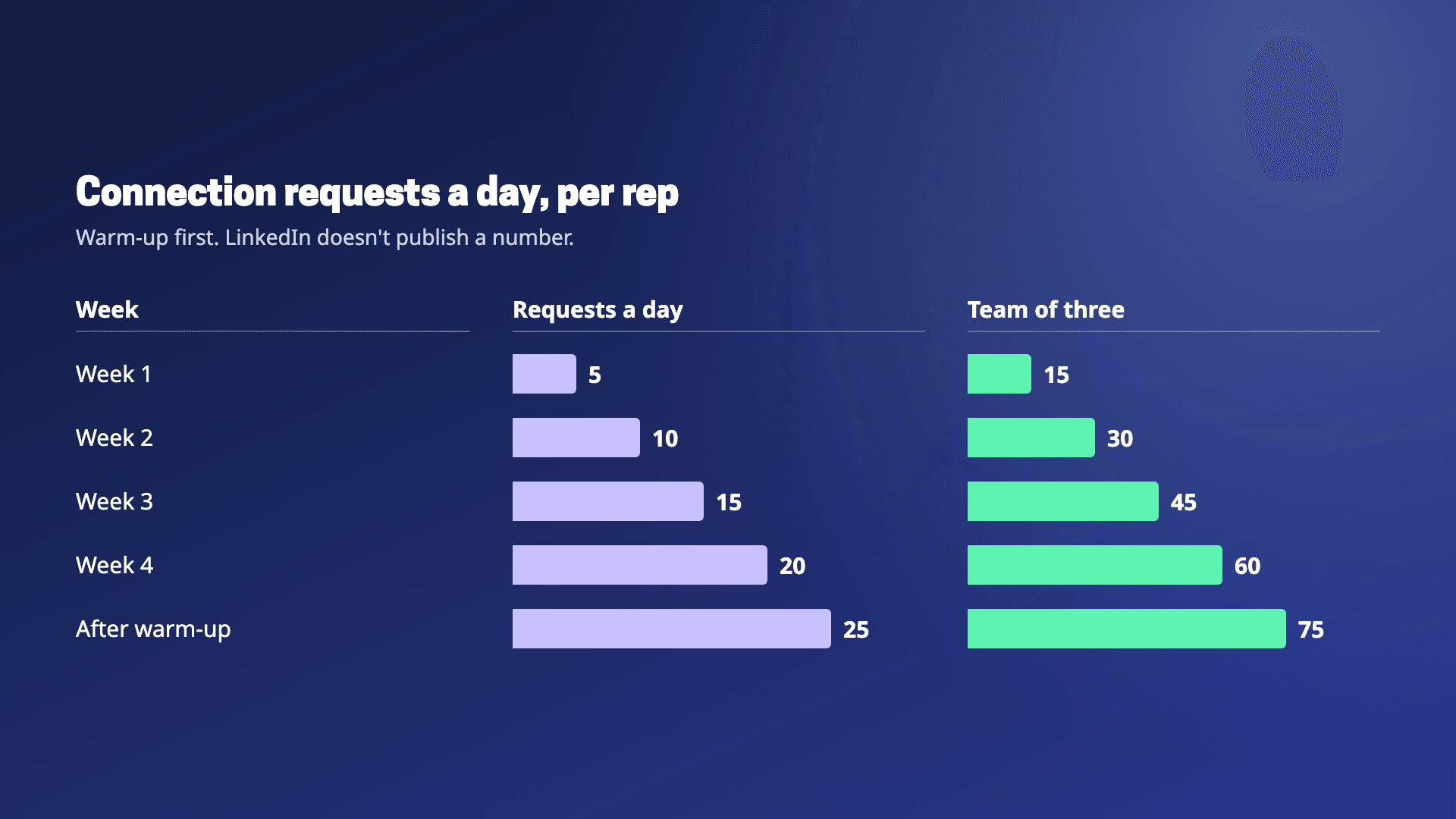
Short answer: LinkedIn doesn't publish a daily or weekly number. Its help page says invitation limits exist "to prevent misuse and promote thoughtful networking", and if you hit one, the restriction typically lasts a week. Steven, our CEO, tells teams to start at about 5 requests a day per person and build up to about 25. The limit is per person, so a team of several people can reach far more of its market than one rep. Send to people who fit your ICP, from the person on your team they're most likely to know or care about, and go slow: a bad first message stays in their inbox. Teamfluence shows who's already engaging with your team, so the requests go to people who know your name.
Last updated: 24 Nov 2026
This question comes up on almost every sales call we have. A founder or a head of sales has a list of target accounts and wants to know how fast the team can connect with the decision makers on it. Usually they've read a number in a blog post or heard one from an agency.
Steven answers it the same way every time: with a warm-up, a bit of math, and a warning about burning contacts. I'll go through all three. First, what LinkedIn itself says.
What does LinkedIn say about connection request limits?
LinkedIn's help page on the invitation limit doesn't give a number. Here's what it does say (LinkedIn Help: Invitation limit reached, checked 9 Nov 2026):
- Invitation limits are in place "to prevent misuse and promote thoughtful networking."
- All members are subject to them, free and Premium.
- If you reach the limit, the restriction typically lasts one week, and LinkedIn can't shorten it.
- Withdrawing pending invitations won't remove the restriction.
- On a free account you can add a personal note to 5 connection requests per month. Premium members can send unlimited personalized notes.
- LinkedIn suggests inviting people you know and trust, and sending fewer, more thoughtful invitations.
You'll find weekly numbers on other websites. They don't come from LinkedIn, so I won't repeat them here.
How many requests per day does Steven recommend?
Steven's rule on our calls: start slow, at around 5 requests a day per person, and build up to about 25 a day over the first weeks. He says it this way to explain why you shouldn't rush:
"you don't wanna burn contacts"
He also reminds people that the limit belongs to the person's account, not to the team.
25 a day is Steven's working number from what our team has seen. LinkedIn doesn't publish one, and it can change how it applies limits at any time. Watch for the warning and slow down if you get it.
What does the math look like for a team?
This is the part Steven likes to do live on calls. At 25 requests a day, one person sends 25 x 365 = 9,125 connection requests in a year.
That's one person. Steven's next point is that the limit applies to each person, so the team multiplies it. On another call he put it as a round robin: three reps sharing one target list can send 75 requests a day instead of 25. For a team of ten, it's ten times what one rep can do.
How many people accept depends on who you invite, who sends it and what their profile looks like. We don't publish an acceptance rate, so I'll stop the math at the requests.
| One rep | A team sharing a target list | |
|---|---|---|
| Daily volume | About 25 a day after the warm-up (Steven's number) | About 25 a day per person; three reps = 75 a day (Steven's example) |
| Who the buyer hears from | Whoever happens to own the account | The person they're most likely to know: an executive, a peer, the author of a post they liked |
| Coverage of an account | One relationship | Several people at the same company, from different people on your team |
| Risk if the message is bad | One burned contact | The same, multiplied, so the warm-up matters more |
| LinkedIn's limit | Applies to the person (a550555) | Applies to each person separately |
Does cold outreach on LinkedIn still work?
In October we interviewed an M&A advisor who has worked in his industry for decades. He sends 5 to 10 connection requests a day by hand, with no note, and told us about 80% accept and 5 to 10% respond. Then he told us where his current deals come from: roughly half from people on LinkedIn who already knew him, the rest from referrals.
"Cold LinkedIn zero"
So a high acceptance rate didn't turn into deals with strangers. The deals came from people who already knew him. That matches what Steven says about the number of requests: the count matters less than who receives them and whether they've seen your name before.
Who on your team should send each request?
- Start with people who already engaged. Someone who liked your CEO's post, viewed your head of sales' profile or followed the company page knows your name. A request to them is warm. More on sorting them in how to qualify people who like your LinkedIn posts.
- Send from the person they engaged with. If they liked your CEO's post, the request comes from your CEO. That's the name they already recognize.
- Spread target accounts across the team. That's Steven's round robin. Several people at the same account, each connected to a different person on your team. See warm intros to target accounts.
- Keep the first message short and about them. Steven's version after someone accepts: thanks for accepting, saw you liked my post about the topic, and a question. No pitch.
- Let your posts do the next step. After someone accepts, your posts start showing up in their feed. Wait for a second signal (a like, a profile visit) before you ask for anything.
Why does Steven say start slow?
Two reasons he gives on calls.
First, the messages stay. Steven: "You cannot delete direct messages on LinkedIn. You will burn your network." A cold email gets buried. A bad LinkedIn message is still there next to your name the next time that person opens your profile.
Second, old contacts are hard to bring back. When a team says it has thousands of connections and wants to find the ICP ones, Steven warns that "old contacts are very hard to activate. They don't remember why they're connected with you." A new connection made around a post they liked is easier to talk to.
I took this one personally. A while ago I removed almost everyone from my own LinkedIn connections and started over, only connecting with people in our ICP. Before that, my posts went mostly to old colleagues from other industries. Now the people who see them are closer to the people we sell to.
How does Teamfluence help with connection requests?
Teamfluence collects the people who engage with your team on LinkedIn: likes and comments on posts, profile visitors, followers of personal profiles and the company page, new connections and ad engagers. It does this for everyone on the team at once, and seats are unlimited.
You qualify those people by hand, with an AI agent that scores each one 1 to 5 against your ICP with a one-line reason, or by matching them to your target accounts. The qualified list tells you who to send requests to first and which person on your team they already engaged with. You can send it to your CRM, a CSV, Slack, a webhook, the API or MCP.
You pay for leads, not seats. See pricing.
What it doesn't do: it doesn't send email sequences. Leads go to your sequencer if you use one.
FAQ
What is LinkedIn's daily connection request limit?
LinkedIn doesn't publish one. Its help page says limits exist to prevent misuse, apply to all members, and that a restriction typically lasts one week (LinkedIn Help a550555, checked 9 Nov 2026).
Does Premium raise the limit?
The help page says Premium members can send unlimited personalized notes, while free members can add a note to 5 requests a month. It says all members are subject to invitation limits. It doesn't say Premium raises them.
What happens if I hit the limit?
You can't send invitations for a while, typically one week. Withdrawing pending invitations won't remove the restriction, and LinkedIn support can't shorten it.
Should I add a note to every connection request?
On a free account you can only add a note to 5 requests a month. A request with no note from someone who just engaged with your post often works fine, because they already know who you are.
How many requests should a new rep send in the first week?
Steven's advice is to start around 5 a day and build up. Go slower if the rep's profile isn't ready yet. People look at the profile before they accept.
Send requests to people who already know you
If your team is about to start connection campaigns, start with the people already engaging with your posts and profiles. We can show you who they are. Talk to us.