

Short answer: LinkedIn doesn't send the people who like, comment on or visit your team's profiles to a CRM on its own. Its connectors cover two narrower things: Lead Gen Form submissions and Sales Navigator activity. Zapier's LinkedIn app has no trigger for likes, comments or profile views either. To push engaged people into your CRM automatically, you need a tool that collects engagement across your team, checks each person against your ICP or target accounts, and creates or updates the CRM record. Teamfluence does this natively for HubSpot and Salesforce, and through webhooks (Make, Zapier, n8n) for other CRMs.
Last updated: 22 October 2026
Someone at a B2B agency in the Netherlands told us what they wanted on their first call: a tool that could "harvest ... like all LinkedIn engagement. So profile visits, likes, followers, comments, everything that happens on a personal profile and or company profile and push that to [HubSpot]."
Most teams ask for the same thing. Then they find out their CRM's LinkedIn connector does something else.
This guide covers what LinkedIn and your CRM can sync on their own, why you shouldn't push everyone, the setup that works, and the tools that do it. Every LinkedIn, HubSpot and Zapier fact links to their own pages, checked on 22 October 2026.
What can LinkedIn send to your CRM on its own?
Three things, and none of them is post engagement.
1. Lead Gen Form submissions. When someone fills in a LinkedIn lead form, LinkedIn says you "might be able to integrate your Lead Gen Forms with your partner" (your CRM or marketing automation platform), or download the leads as a CSV and upload them. Zapier's LinkedIn Ads app has two triggers, both for form responses: one for organic content, one for sponsored content.
2. Ad interactions in HubSpot. HubSpot's LinkedIn Ads integration syncs leads from the ad accounts you choose, and with auto tracking on, it tracks contacts who "interact with your ads". Organic posts and profile visits aren't mentioned.
3. Sales Navigator activity. Sales Navigator's plans page lists CRM sync "across Salesforce, HubSpot, and more". That covers your reps' side: the leads and accounts they work and what they send. We went through what it writes back in the Salesforce guide.
And Zapier's main LinkedIn app has two actions (post a company update, post a share update) and no triggers at all.
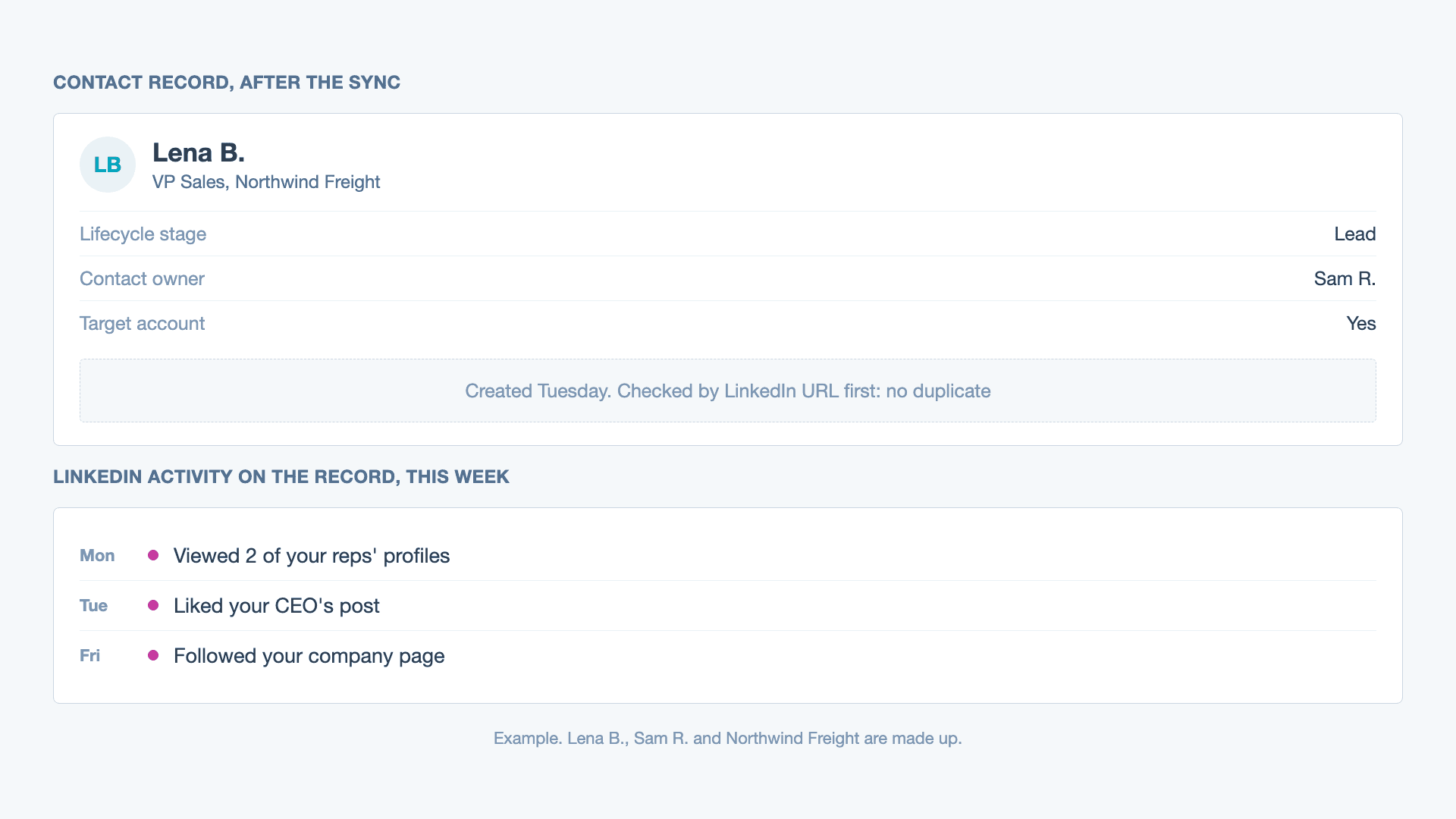
So form fills, ad clicks and your reps' outbound work can reach the CRM. A buyer who likes your CEO's post, visits three reps' profiles and follows your company page doesn't.
Should you push everyone who engages into your CRM?
No. The people who like your team's posts are mostly peers, recruiters, ex-colleagues, friends and your own employees. Push all of them and your CRM fills with contacts nobody will call, and reps stop trusting the list.
One customer in GTM operations at a procurement software company said it on their onboarding call: "we don't want to bring these people in because they're employees."
Push the ones who pass a check:
- They fit your ICP: title, seniority, company size, industry.
- Or they work at a target account.
- And they engaged more than once, or did something stronger than a like (a comment, a profile visit, a company page follow). A threshold one prospect gave us: only push people with 3 to 5 engagements.
How to run that check is in how to qualify people who like your LinkedIn posts.
What does an automatic setup look like?
Five steps, whatever tool you use:
- Collect engagement from everyone who posts, plus your company page, in one place. A buyer rarely engages with only one person.
- Qualify each person: an ICP score, a target account match, or a quick manual review for the borderline ones.
- Set the rule for what gets pushed. For example: qualified and engaged at least twice, or any engagement from a target account.
- Match before you create. Check for an existing contact by LinkedIn URL, name and email, and update it if it's there. Nobody wants a "new" lead who has been a contact for two years.
- Write what they did and when on the record, and update it every time they engage again. Then the rep opening the contact sees "liked two posts and visited the CEO's profile this week", not an empty timeline.
Optional: send the account owner a Slack message for target accounts, so they don't wait for the next CRM review.
Can you do it with Zapier, Make or n8n?
Yes, if something sends them the engagement first. Zapier, Make and n8n can receive a webhook and create or update a contact in almost any CRM. What they can't do is see LinkedIn likes, comments or profile visits by themselves: the LinkedIn apps above don't offer those triggers.
So the setup is: an engagement tool sends a webhook for each qualified person, and your automation tool writes it to the CRM. Teamfluence's webhooks work with Make, Zapier and n8n. Jungler's site lists webhooks and an API too.
Some teams build the middle in Clay. One customer, who runs the LinkedIn program for an AE team, described their old flow: "we check, okay, other people commenting or interacting with his posts. And if so, we are kind of like qualifying them in a clay table to see if they are ICP. And then we push them to Hey Reach campaigns." It works, but it's three tools to maintain, and the CRM still comes last.
Ways to get LinkedIn engagers into your CRM, compared
| What gets in | Likes and comments | Profile visits | Qualification | Where it goes | |
|---|---|---|---|---|---|
| Lead Gen Forms + CRM partner or Zapier | Form submissions | No | No | No | Your CRM via partner, Zapier or CSV |
| HubSpot LinkedIn Ads integration | Ad leads, contacts who interact with ads | Ads only | No | No | HubSpot |
| Sales Navigator CRM sync | Your reps' Sales Navigator work | No | No | No | Salesforce, HubSpot and more |
| Zapier LinkedIn app | Nothing (no triggers) | No | No | No | n/a |
| Jungler | Likes and comments on profiles, pages or keyword searches you choose, with work email | Yes | Not listed | Not listed as a filter | Clay, Slack, HeyReach, lemlist, Instantly, webhooks, API. No CRM listed |
| Postbeam | Likes, comments and profile views on your team's posts and profiles | Yes | Yes | ICP filters | One-click export to HubSpot, Salesforce or CSV |
| Teamfluence | Likes, comments, profile visits, new connections, followers (personal and company page), ad engagement | Yes | Yes | ICP score 1 to 5 + target account list | Native HubSpot and Salesforce sync, Slack, webhooks (Make, Zapier, n8n), API, MCP |
"Not listed" means the company's own site doesn't say, as of 22 October 2026. Prices: Jungler from $99/month billed yearly (pricing), Postbeam $39 per seat/month with 2+ seats (postbeam.ai), Teamfluence from $299/month (pricing).
How does Teamfluence push engagers into HubSpot or Salesforce?
Teamfluence collects engagement from every team member you add and your company page in one workspace. Each person is qualified three ways: by hand, by an AI agent that scores them 1 to 5 against your ICP with a one-line reason, or by your target account list.
Qualified people sync to HubSpot or Salesforce automatically. If the contact exists, the record is updated. If not, it's created, and in Salesforce the company goes on the Account. Every new engagement updates the record, so reps see what the person did and when. Workflows decide what goes where: a new qualified person, a specific signal like a profile visit, an engagement score over a threshold, or a target account match can each trigger a CRM sync, a list, a Slack message or a webhook.
You pay for qualified leads, not seats: a lead counts the first time you move it out of Teamfluence (CRM push, webhook, Slack, CSV export or API). Plans start at $299/month for 500 qualified leads a month.
Step by step for each CRM: HubSpot · Salesforce.
FAQ
Can Zapier pull LinkedIn likes or comments? No. As of 22 October 2026, Zapier's LinkedIn app has no triggers, and its LinkedIn Ads app triggers only on lead form responses. You need a tool that sends the engagement to Zapier by webhook.
Does HubSpot's LinkedIn integration track post likes? HubSpot's LinkedIn Ads integration tracks contacts who interact with your ads. For organic likes, comments and profile visits, see what HubSpot's LinkedIn integrations cover.
Do I need Sales Navigator to push engagers into my CRM? Not for Teamfluence: its HubSpot and Salesforce integrations don't use Sales Navigator. Sales Navigator's own CRM sync covers your reps' activity, not engagement on your posts.
Will it create duplicate contacts? It can. Matching by LinkedIn URL, name and email catches most, but if a work email is found for someone your CRM has under a personal email, you can get two records. Check the first week after you connect.
What about Pipedrive or other CRMs? Use a webhook into Make, Zapier or n8n, and let it create or update the contact in your CRM.
How often should the CRM record update? Every time the person engages again. One like is noise. A second like and a profile visit in the same week is a reason to call.
See it in your CRM
If your team posts and you want the people who engage in HubSpot or Salesforce, filtered to your buyers: talk to sales and we'll show you what lands on the record, with your own team's data.
Related: HubSpot LinkedIn integration · Salesforce LinkedIn integration · The programmable GTM stack