


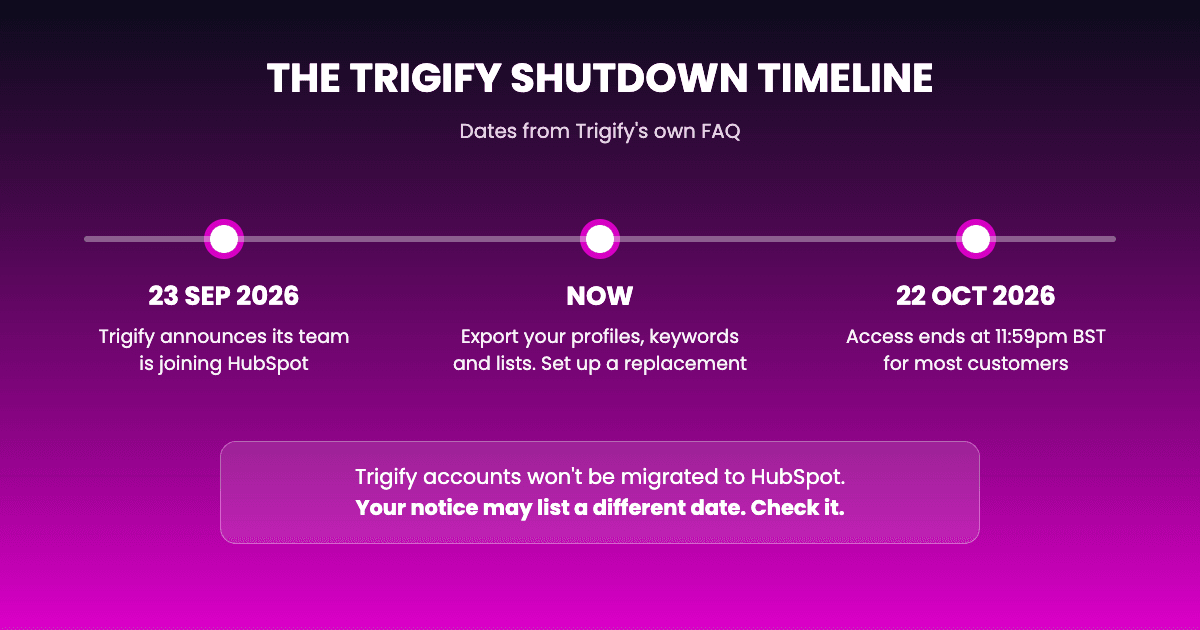
Short answer: The Trigify team is joining HubSpot, and the standalone Trigify platform is closing. For most customers, access ends at 11:59pm BST on 22 October 2026. Your Trigify account won't be migrated to HubSpot, and Trigify says your data won't be used by HubSpot. So if you use Trigify today, you need to export your setup and move to another tool before your end date.
Last updated: 1 October 2026
Did HubSpot buy Trigify?
On 23 September 2026, Trigify announced that its team is joining HubSpot. In the same announcement, Trigify said the standalone platform is being retired.
That's the part that matters for customers. The people are going to HubSpot. The product you log into isn't.
Everything below comes from Trigify's own announcement. Where Trigify doesn't say something, we say that too, instead of guessing.
What changes for Trigify customers, at a glance
| What Trigify says | Source | |
|---|---|---|
| Access | Ends at 11:59pm BST on 22 October 2026 for most customers | trigify.io |
| Your account | Won't be migrated to HubSpot | trigify.io |
| Your data | Won't be used by HubSpot; retained or deleted under Trigify's obligations | trigify.io |
| Your subscription | Won't renew beyond your end date | trigify.io |
| A HubSpot replacement | Not mentioned | trigify.io |
| Help with exports | hugo at trigify.io | trigify.io |
Is Trigify shutting down?
Yes. For most customers, access stays available until 11:59pm BST on 22 October 2026. If your contract has a different notice period, Trigify will tell you your own date.
Until then, you can keep using Trigify as normal. After that, the platform is gone.
Will my Trigify account move to HubSpot?
No. Trigify's announcement says it plainly: your Trigify account will not be migrated to HubSpot.
Your tracked profiles, saved searches, lists and workflows stay in Trigify until the end date, and then they're gone with it. Nothing carries over automatically.
Is HubSpot launching a Trigify replacement?
Trigify's announcement doesn't name any HubSpot product that replaces Trigify, and it doesn't promise one.
So plan as if there's nothing to move to inside HubSpot. If HubSpot announces something later, you can look at it then. Your Trigify access still ends on your end date either way.
What happens to my Trigify data?
Trigify says your customer data won't be used by HubSpot, and that it will be "retained or deleted in accordance with our contractual, privacy and legal obligations."
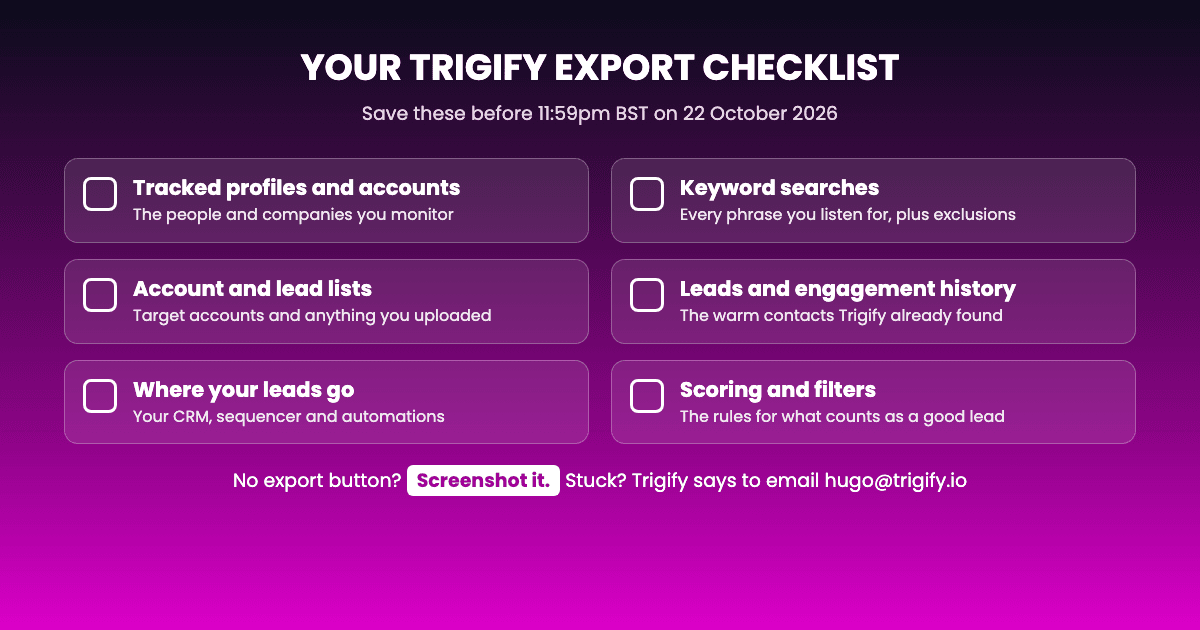
In practice, that means one thing for you: if you want to keep it, export it before your end date. Trigify asks customers to use the export options in the product, or to email hugo at trigify.io for help.
Not sure what to save? Our Trigify export checklist walks through it: tracked profiles, keyword searches, lists, where your leads go, and screenshots of anything you can't export.
What happens to my Trigify subscription and billing?
Trigify says your subscription won't renew beyond your service end date. Details about final invoices, charges, credits or refunds are sent to each account directly.
If you haven't heard from them about your account, email hugo at trigify.io before 22 October.
I send Trigify leads to HubSpot. What happens to them?
Plenty of teams used Trigify to push leads into HubSpot, the CRM. Two things are worth separating:
- Leads already in your CRM live in your CRM, not in Trigify. Your HubSpot records don't depend on Trigify being open.
- New leads stop arriving the moment Trigify closes. That's the part you need to replace: whatever spots the engagement and sends it to your CRM.
If HubSpot is where your team works, pick a replacement that writes into HubSpot directly, so the switch doesn't change anything for your reps. (Teamfluence has a native HubSpot integration, for what it's worth.)
Will my Trigify integrations keep working until 22 October?
Until your end date, yes. Then they stop. Trigify says integrations and API access stop when account access ends (11:59pm BST on 22 October 2026 for standard customers), and monitoring and signal collection stop too.
So check anything that pulls from Trigify, like a CRM sync, Clay, Zapier or n8n, and switch it over before that date. Trigify asks customers to do the same.
What should you do before 22 October?
Three steps, in this order:
- Export your setup now. Profiles, searches, lists, and a note of where each lead goes today. The export checklist has the full list.
- Pick a replacement by what you actually used Trigify for. Engagement on posts and profiles, keyword listening and outreach are different jobs, and different tools are good at each. We compared nine of them in Trigify alternatives for 2026.
- Run both side by side before your end date. Turn the new tool on while Trigify still works, check the leads match, then let Trigify go. Switching on 22 October means a gap in your pipeline.
Where Teamfluence fits
We make Teamfluence, so take this with that in mind.
If you used Trigify to see who engages with your team's posts and profiles, track specific people and companies, and send those leads to HubSpot, Salesforce, Slack or a webhook, Teamfluence covers those jobs. For Trigify customers, we rebuild your setup from your export and run it alongside Trigify until your end date. See how the migration works.
One honest limit: our keyword monitoring covers posts from the profiles you track, not the whole network. If network-wide keyword listening was your main use of Trigify, look at the keyword tools in our alternatives comparison first.
FAQ
When does Trigify close? For most customers, at 11:59pm BST on 22 October 2026. Customers with a different notice period get their own date from Trigify.
Is HubSpot replacing Trigify? Trigify's announcement doesn't name a HubSpot replacement. The team is joining HubSpot; the platform is being retired.
Will my Trigify data move to HubSpot? No. Your account won't be migrated, and Trigify says HubSpot won't use your data.
Who do I contact at Trigify? hugo at trigify.io, for exports and account questions.
Will I be charged after Trigify closes? Trigify says subscriptions won't renew beyond your end date. Final invoice, credit and refund details come to each account directly.
Can I keep my Trigify setup? Not inside Trigify. Export it before your end date, then rebuild it in the tool you move to. Some vendors, us included, will rebuild it for you from your export.