

TL;DR: Trigify closes at 11:59pm BST on 22 October 2026 and accounts don't move to HubSpot, so every customer needs a Trigify alternative. For engagement on posts and profiles, the closest replacements are Teamfluence, SignalRaven and OutX. For keyword listening, look at Buska or OutX; for outreach done for you, Gojiberry; and if someone on your team likes to build, Clay or PhantomBuster. If you want the most of Trigify's jobs in one tool, with client workspaces and an MCP server for your AI assistant, Teamfluence covers the most ground. Whatever you pick, export your Trigify data before your end date.
A Trigify alternative is any tool that can do the job you used Trigify for: spotting people who engage with posts, profiles or keywords, and getting them into your CRM or outreach while the interest is fresh.
Full disclosure: we make Teamfluence, and it's first on this list. We've tried to be fair. Every entry, ours included, says what to check before you switch, and every price links to the vendor's own pricing page.
What exactly is happening to Trigify?
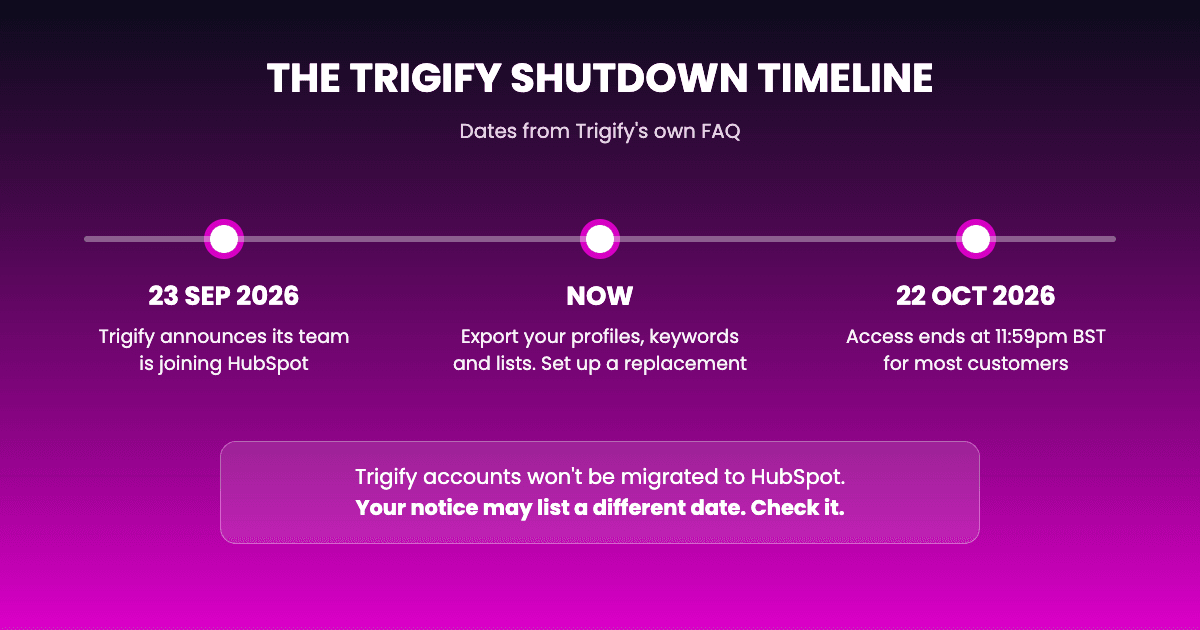
On 23 September 2026, Trigify announced its team is joining HubSpot. The same announcement says the standalone Trigify platform is winding down.
Here's what Trigify's own FAQ says, and nothing more:
- For most customers, access ends at 11:59pm BST on 22 October 2026. Customers with a different notice period get their own date directly.
- Trigify accounts won't be migrated to HubSpot, and customer data isn't transferred.
- You can keep using Trigify until your end date. Trigify asks customers to export what they want to keep before then, using the export options in the product, or by emailing its team.
So this isn't a "wait and see" situation. Every Trigify customer needs a new setup within four weeks.
What did people actually use Trigify for?
Before comparing tools, it helps to name the job. Most teams used Trigify for some mix of these:
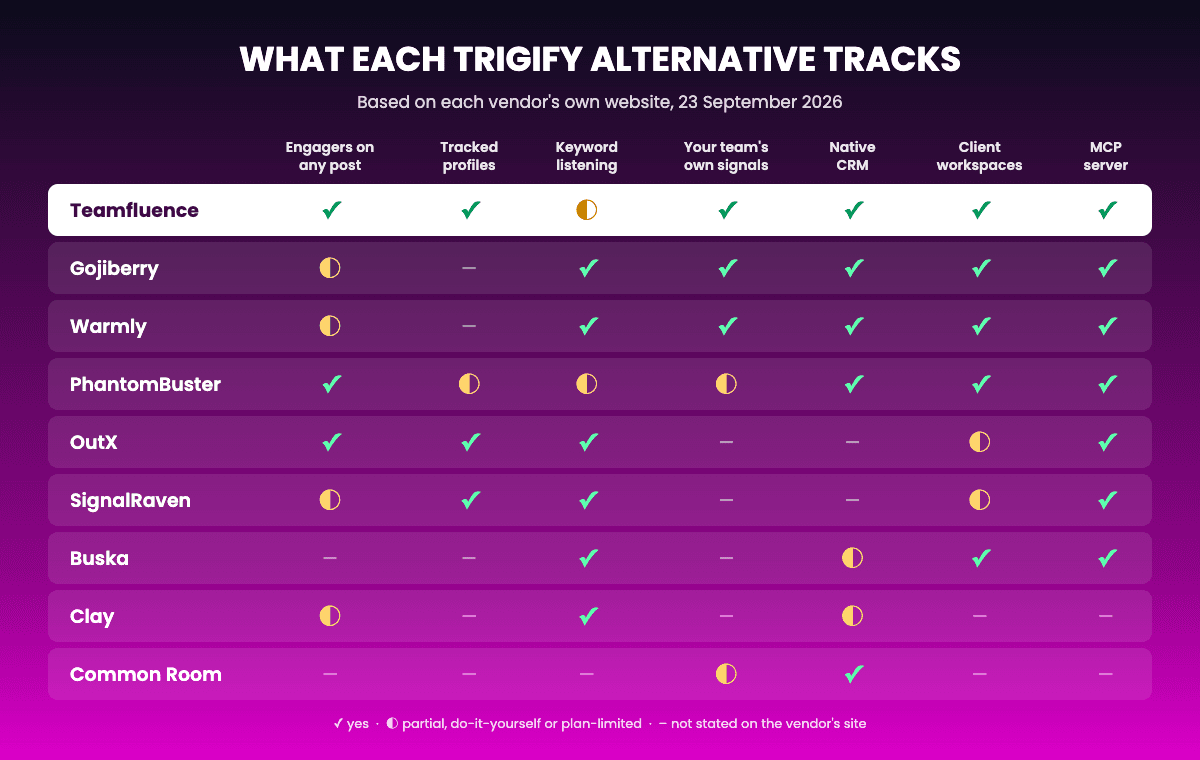
- Engagement on posts and profiles. Who liked or commented on a competitor's post, an influencer's post, or your own.
- Tracked people and accounts. Following specific profiles and target companies, and hearing when they're active.
- Keyword listening. Finding posts that mention a topic, a competitor or a pain point.
- Getting leads somewhere useful. Pushing people into a CRM, a sequencer or a Slack channel.
No tool on this list does all four identically. The right pick depends on which of the four you relied on most.
What should you look for in a Trigify alternative?
Seven things decide whether a replacement works for you, or quietly doesn't.
- Signal coverage. Does it track the jobs you used Trigify for? Post engagers, tracked profiles and keyword listening are three different features. Plenty of tools do one well and skip the others.
- Where leads land. A native CRM connector and "connect it through a webhook" are very different amounts of work. Check which one you're getting, and on which plan.
- Setup effort. Some tools work out of the box. Others give you building blocks. Both are fine, as long as someone on your team has the time.
- How pricing scales. Per seat, flat monthly, credits, or an annual contract. The cheapest entry plan isn't always the cheapest once your team uses it.
- Migration help. Will someone move your tracked profiles, keywords and lists for you, or are you rebuilding everything by hand before 22 October?
- Getting your setup in. Can you import your tracked profiles, keywords and lists, or will you rebuild them by hand?
- AI access. Can Claude, ChatGPT or your own agents read the signals directly, through an API or an MCP server? More teams now expect their AI assistant to do the first pass.
How much did Trigify cost, and what will you pay now?
Trigify's pricing page now redirects to its shutdown notice, so the best reference is your own last invoice. It's also the number to bring to any vendor offering a price match.
The alternatives price in four different ways:
- Teamfluence: Special offer for Trigify users.
- Flat monthly plans: SignalRaven, OutX, Gojiberry, Buska and PhantomBuster, most starting around $99 a month.
- Actions and credits: Clay, and SignalRaven's credits on top of its flat plans.
- Annual or quarterly contracts: Common Room and Warmly.
If your team has several people using signals every day, compare the price at your real team size, not the entry price.
Trigify alternatives at a glance
| Tool | Best for | Overlap with Trigify | Starts at (list price, 23 Sep 2026) |
|---|---|---|---|
| Teamfluence | Sales teams and agencies who want qualified leads in their CRM | High | Flat fee per workspace |
| SignalRaven | SDR and RevOps teams who want engagers already filtered by ICP | High | $99/month |
| OutX | Solo founders and small teams who want keyword and profile alerts | High | Free plan, paid from $99/month |
| Gojiberry | Small teams who want an AI agent to find signals and run outreach | Partial | $99/month |
| Buska | Small teams finding buyers in public posts across many sites | Partial | $49/month |
| PhantomBuster | Hands-on users who build their own automations | Partial | $56/month billed annually |
| Clay | Teams with ops people who build their own workflows | Partial | Free plan, paid from $167/month billed annually |
| Warmly | Teams with real website traffic who also want social signals | Partial | From $10,000/year |
| Common Room | Mid-size and larger teams combining many signal sources | Partial | $2,500/month, billed annually |
On Trigify today and short on time? We'll rebuild your setup for you. See the Trigify rescue plan →
1. Teamfluence
Why it's #1 on this list: it's the only tool here that covers all of these in one place: engagement on any post, your whole team's own signals, native CRM delivery, a separate workspace per client, and an MCP server for your AI assistant. It's also the only one offering to rebuild your Trigify setup for you and match your current price.
What it is: A signal tool that finds the people engaging with posts, profiles and your team, scores every lead against your ICP, enriches it, and sends it to your CRM.
What it tracks:
- Engagement on any post you choose, including competitors', influencers' and paid ads (how Post Tracking works)
- Tracked profiles and their posts
- Your whole team's activity: profile views, follows, connections, and reactions and comments on your team's posts. Most tools on this list only see public posts. Teamfluence also sees who's engaging with your people.
- Target account lists (CSV upload or from HubSpot), matched against every new lead
- Keyword monitoring on posts from the profiles you track
What happens to a lead: it gets an engagement score, the AI agent checks it against your ICP, verified email enrichment runs, and it lands in your CRM, Clay, or Slack already qualified. You get a shortlist, not a raw export.
Where leads go: Native HubSpot and Salesforce, Slack, webhooks (which also work with Make, Zapier and n8n), an API, and an MCP server, so AI assistants like Claude and ChatGPT can work with your signals directly. See all integrations.
Teams and agencies: Every team member's activity feeds the same workspace. Agencies get one separate workspace per client, each with its own ICP, signals and leads (how agency workspaces work).
Price: Check out full pricing tiers.
Best for: sales teams, content marketing agencies and GTM agencies who want qualified leads in their CRM, show results to their clients, and build more pipeline from their team's activity and from any post they choose to watch.
For Trigify customers: send us your Trigify export and we'll rebuild your setup for you, at your current price for the first 3 months. See the Trigify rescue plan →
2. SignalRaven
What it is: A tool that watches public activity, scores each person who engages against your ICP, and sends qualified signals with context to your team.
What it tracks: People engaging with competitor company pages and their employees' posts, engagement on your own company posts, tracked people, keyword and hashtag searches, and posts that mention a company you choose. Repeat activity from the same person raises their urgency.
Where leads go: Slack, Google Sheets, Notion, Clay, n8n and signed webhooks, plus an API and an MCP connector. HubSpot, Salesforce, Pipedrive and Attio connect through a webhook. Sequencers connect through Zapier, Make or n8n.
Teams and agencies: 1 seat on Solo, 5 seats and multi-team workspaces on Pro, unlimited seats on Scale. Client accounts for agencies aren't described.
Price: Solo is $99/month with 2,500 credits, 1 seat and 1 destination. Pro is $399/month and Scale is $799/month. Extra credits cost $0.06 each. The trial gives you 2,500 free credits with no card and no time limit. (source)
Best for: SDR and RevOps teams who want ICP-scored engagers delivered to Slack, Sheets or Clay.
Check before you switch:
- SignalRaven has no native CRM connectors. Getting leads into HubSpot or Salesforce means setting up a webhook.
- It doesn't describe capturing your own team's signals, like who viewed or followed your reps.
- Usage runs on credits, and Solo is limited to one seat and one destination.
3. OutX
What it is: A social listening tool that watches keywords, people and company pages, and helps you reply.
What it tracks: Keyword mentions in posts, tracked people (their posts, activity and job changes), company page posts, and the people who like or comment on tracked posts. It also covers Reddit.
Where leads go: Slack alerts (from the Expert plan), email notifications, CSV export (from Growth), an API and an MCP server. Its docs list no native CRM or sequencer connectors, and outbound webhooks are marked "coming soon".
Teams and agencies: Team members from 5 on Free to unlimited on Ultimate. An agency plan with custom limits is available on request.
Price: Free plan. Growth is $99/month, Expert $249/month, Ultimate $999/month. Paid plans have a 7-day trial that takes a card upfront. (source)
Check before you switch: If leads need to land in your CRM automatically, you'll be building that through the API for now.
4. Gojiberry
What it is: An AI outbound agent. It finds prospects from social and buying signals, then runs the email and social outreach itself.
What it tracks: Engagement with your company and content, profile visits, company followers, people engaging with competitors, topic and keyword engagement, job changes, hiring, funding and tech stack.
Where leads go: Native HubSpot and Salesforce (Pipedrive is named on the homepage), an outbound webhook, an API, an MCP server and CSV export. Outreach runs inside Gojiberry.
Teams and agencies: Agencies can add separate workspaces per client as "organization members", at $99/month each.
Price: Pro is $99/month. Extras include more outreach agents ($59/month) and more lead sources ($29/month). The 7-day trial needs a card and converts automatically. (source)
Check before you switch: It's built to do the outreach for you. If you want signals fed into the sequencer you already run, test that path in the trial.
5. Buska
What it is: A keyword listening tool that scans 30+ public platforms for buying intent, pain and competitor mentions.
What it tracks: Keyword conversations across many sites, including the main professional network, plus hiring signals. It doesn't describe tracking who engages with a specific post or profile.
Where leads go: Slack and Discord on all paid plans. Webhooks, CSV export, API and HubSpot start on Growth. Its docs also list Salesforce, Pipedrive, Lemlist, Apollo, Instantly, Clay, an MCP server and more.
Teams and agencies: 1 team member on Starter, 5 on Growth, unlimited on Scale. Agencies can run a separate workspace per client.
Price: Starter is $49/month, Growth $99/month, Scale $249/month. Annual billing gives you 12 months for the price of 10. 7-day trial, no card. (source)
Check before you switch: Great for "who's asking for a tool like ours", not for "who engaged with this post". The trial excludes CSV export, Slack and CRM, so test delivery on a paid month.
6. PhantomBuster
What it is: A cloud automation tool that pulls data from 15+ platforms and runs outreach steps, using ready-made templates you configure.
What it tracks: People who comment on or react to posts from a company page, a profile, a single post or a post search, checked daily. It can also track job changes for HubSpot contacts, company followers and group members.
Where leads go: Native HubSpot, Salesforce and Pipedrive, plus Clay, Zapier, Make, n8n, webhooks, an API, an MCP server, CSV and Google Sheets.
Teams and agencies: Up to 100 members per workspace, and each workspace has its own billing, which suits agencies running clients separately.
Price: Start is $56/month billed annually ($69 monthly), Grow $128/month annually, Scale $352/month annually. 14-day free trial, no card. (source)
Check before you switch: You set up the inputs and schedules yourself, and runs are capped by execution time and automation slots.
7. Clay
What it is: A data and workflow platform with enrichment, AI research agents, signals, CRM sync and its own sequencer.
What it tracks: Job changes, company news and funding, and social keyword and brand mentions (from Launch), plus website intent (from Growth). You can also build custom signals from any enrichment.
One thing Trigify users should know: Clay's own documentation shows its keyword-based "find people engaging with social content" source running on its Trigify integration. If your Clay tables used that source, they'll need a new source too.
Where leads go: CRMs including HubSpot and Salesforce (CRM sync from Growth), sequencers like Outreach, Salesloft, Smartlead, Instantly and lemlist (from Launch), Slack, webhooks and an API (from Growth).
Price: Free plan. Launch is $167/month billed annually ($185 monthly). Growth is $446/month billed annually ($495 monthly). Seats are unlimited on every plan. (source)
Check before you switch: Clay is powerful if someone on your team likes building. If nobody does, it's a lot of setup to replace one tool.
8. Warmly
What it is: A website visitor identification and inbound platform that also tracks social activity and intent data.
What it tracks: Person-level website visitors and page behaviour, plus social activity on your company and team posts, and keyword monitoring of public posts that captures who liked or commented. It also brings in third-party intent, hiring, funding and job changes.
Where leads go: HubSpot, Salesforce and other CRMs, Slack and Microsoft Teams, Outreach, Salesloft, Apollo, Instantly, Clay, webhooks, an API and an MCP server.
Teams and agencies: Agencies can add sub-accounts and manage each client separately.
Price: Paid plans start from $10,000/year, or $4,875/quarter. There's also a free version to try it. (source)
Check before you switch: The site doesn't say which plan includes social signals, so ask on the sales call. It's priced for teams that also want the website side.
9. Common Room
What it is: A buyer intelligence platform that joins website, product, CRM, community and social signals into one profile per person. Common Room's own blog says it's now part of Zoom.
What it tracks: On the main professional network, posts, comments and reactions on your own company page, and posts mentioning it. It also covers other communities and social sites, job changes, website visitors and third-party intent.
Where leads go: Salesforce, HubSpot, Outreach, Salesloft, Apollo, Smartlead, Slack, webhooks and an API.
Price: Essential is $2,500/month, billed annually, with 5 seats. No free plan or trial. (source)
Check before you switch: Its professional-network coverage is your company page only, not any profile, post or keyword. That's a narrower job than Trigify's.
Also considered
- Unify: An outbound platform with 40+ signal sources and its own sequencing. Social engagement is one partner data source, and tracking engagers on specific posts isn't described.
- Letterdrop: Watches activity around competitors' sales reps to flag accounts in an active evaluation. Annual contracts, and it says it isn't a fit for smaller markets.
- UserGems: Job changes and past champions at enterprise scale. No organic social engagement signal, and plans start at $40,000/year.
Which Trigify alternative fits your team?
Answer three questions.
1. Which Trigify job mattered most?
- Engagement on posts and profiles: Teamfluence, SignalRaven or OutX.
- Keyword listening: Teamfluence, Buska or OutX.
- Outreach done for you: Gojiberry.
- Website visitors plus social: Warmly.
2. Where do leads need to land? If your CRM is the source of truth, check for a native connector before you pay. Teamfluence, Gojiberry, PhantomBuster, Clay (from Growth), Warmly and Common Room name native CRM connections. SignalRaven and OutX need a webhook or the API.
3. Who's going to set it up? If your first question is "is this going to be hard to set up?", take it seriously. Clay and PhantomBuster reward someone who likes building. If nobody on your team has the time, pick a tool that works out of the box, or one that sets it up for you.
What's the best Trigify alternative for your kind of team?
- Solo founder or one-person sales team: OutX (free plan) or Buska ($49/month) if you mostly listened for keywords. SignalRaven's Solo plan if you want engagers scored for you.
- Sales team of 3 to 10 reps: Teamfluence if you want every rep's activity captured and leads in your CRM.
- Agency running several clients: Teamfluence gives each client its own workspace. OutX, Buska, Gojiberry and Warmly also describe agency or per-client setups, so compare how each one bills per client.
- Ops or GTM engineering team: Clay or PhantomBuster if you want building blocks. Teamfluence if you want signals delivered to your own stack through webhooks, the API or the MCP server.
- Mid-market or enterprise: Common Room or Warmly, if you're combining social with website, product and third-party intent, and an annual contract is normal for you.
Trigify vs Teamfluence: what maps to what?
If you're weighing Teamfluence specifically, here's how the Trigify features you used carry over.
| In Trigify you used | In Teamfluence it's |
|---|---|
| Profile engagement on tracked accounts | Tracked profiles, plus Post Tracking on any post |
| Influencers | Tracked profiles |
| Social listening and keyword searches | Keyword monitoring on posts from the profiles you track |
| Account lists | Target accounts, by CSV upload or from HubSpot |
| AI signal scoring | Engagement score plus an AI agent that qualifies against your ICP |
| Enrichment | Verified email enrichment |
| HubSpot, Clay, Smartlead or Lemlist pushes | Native HubSpot and Salesforce, plus webhooks, API and an MCP server |
| Slack alerts | Slack notifications |
How we compared these tools
We started from the four jobs Trigify customers used it for, then checked every tool against its own website, pricing page and help docs. We didn't use review sites or other comparison articles as sources. Overlap is our judgement of how much of Trigify's core job a tool covers, based on what the vendor itself describes. Where a vendor's pages disagreed with each other, we used the pricing page.
How do you move off Trigify without losing a week?
- Export now, not on 22 October. Save your tracked profiles, keyword searches and lists using Trigify's export options. If you get stuck, Trigify's FAQ says to email its team.
- Write down where every lead goes today. Which CRM, which sequencer, which Slack channel. That's the part people forget to rebuild.
- Run both tools side by side. Start the new tool while Trigify still works, and compare a week of leads.
- Check any Clay tables that used the Trigify integration as a source.
- Cancel nothing early. Trigify's subscriptions don't renew past your end date, so let it run out while the new setup proves itself.
FAQ
When does Trigify shut down? Trigify says access ends at 11:59pm BST on 22 October 2026 for most customers. Some contracts have a different date, which Trigify sends directly.
Is Trigify becoming part of HubSpot? The Trigify team is joining HubSpot, but the Trigify product isn't continuing inside HubSpot, and accounts won't be migrated.
What's the closest Trigify alternative? For engagement on posts and profiles: Teamfluence. For keyword listening: Teamfluence, Buska and OutX.
What's the cheapest Trigify alternative? OutX and Clay have free plans. Of the paid entry plans here, Buska's Starter is the lowest at $49/month. Check that the plan you pick includes the delivery you need, because several put CRM, webhooks or Slack on higher tiers.
Can I move my Trigify data into another tool? Export what you can from Trigify first. Several tools here accept CSV imports of profiles or accounts. Teamfluence will rebuild your setup from the export for you.
Is there a free Trigify alternative? OutX and Clay have free plans, Warmly has a free version, and PhantomBuster drops to a small free plan after its trial. Free plans are limited, so test whether they cover your volume.
What happens to Clay tables that use Trigify? Clay's documentation shows one of its social-engager sources running on its Trigify integration. If your tables used it, plan a replacement source before 22 October.
Does anyone offer to migrate my Trigify setup? OutX's Trigify page says its team will help move campaigns, lists and rules. Teamfluence rebuilds your setup from your Trigify export and matches your current price for 3 months.
How were these prices checked? On each vendor's own website, on 23 September 2026. Prices change, so confirm before you buy.
Moving off Trigify? Send us your export and we'll rebuild your setup in Teamfluence, at your current price for the first 3 months. See the rescue plan →