

Short answer: LinkedIn only shows each person the engagement on their own posts and profile, so a team view needs a tool. Teamfluence collects likes, comments, profile visits and follows across your whole team and company page, qualifies people against your ICP or target accounts, and pushes them to HubSpot or Salesforce. Postbeam fits teams that also want help writing and scheduling posts. Traxy and Jungler watch any profile, including competitors and creators. AuthoredUp is for post analytics, not names. Common Room is an enterprise signal platform.
Last updated: 22 October 2026
Your CEO posts. Two sales reps post. Your company page posts. Every week some of the right people like, comment, visit a profile or follow the page. Each of those people is visible to one person on your team, in one notification feed, for a few days.
That's the problem these tools solve: one list of the people who engage with your whole team, by name, so someone can follow up while they're paying attention.
We make one of these tools (Teamfluence), so it's in the list. We've tried to be fair about the others and where they fit better. Every competitor fact links to that company's own page, checked on 22 October 2026.
What should a team engagement tool show you?
Five things separate a useful tool from a nicer analytics chart:
- Names, not totals. "42 reactions" doesn't help sales. "Lena B., VP Sales at a target account, liked two posts and visited your CEO's profile" does.
- The whole team in one place. Every person who posts, plus the company page.
- Silent signals too. Most buyers never comment. They read, visit a profile, follow the page.
- A filter for who matters. Your ideal customer profile, or your target account list. Otherwise you get recruiters and old classmates.
- A way out. Your CRM, Slack, your sequencer, a CSV. A list nobody acts on is just another dashboard.
The tools compared
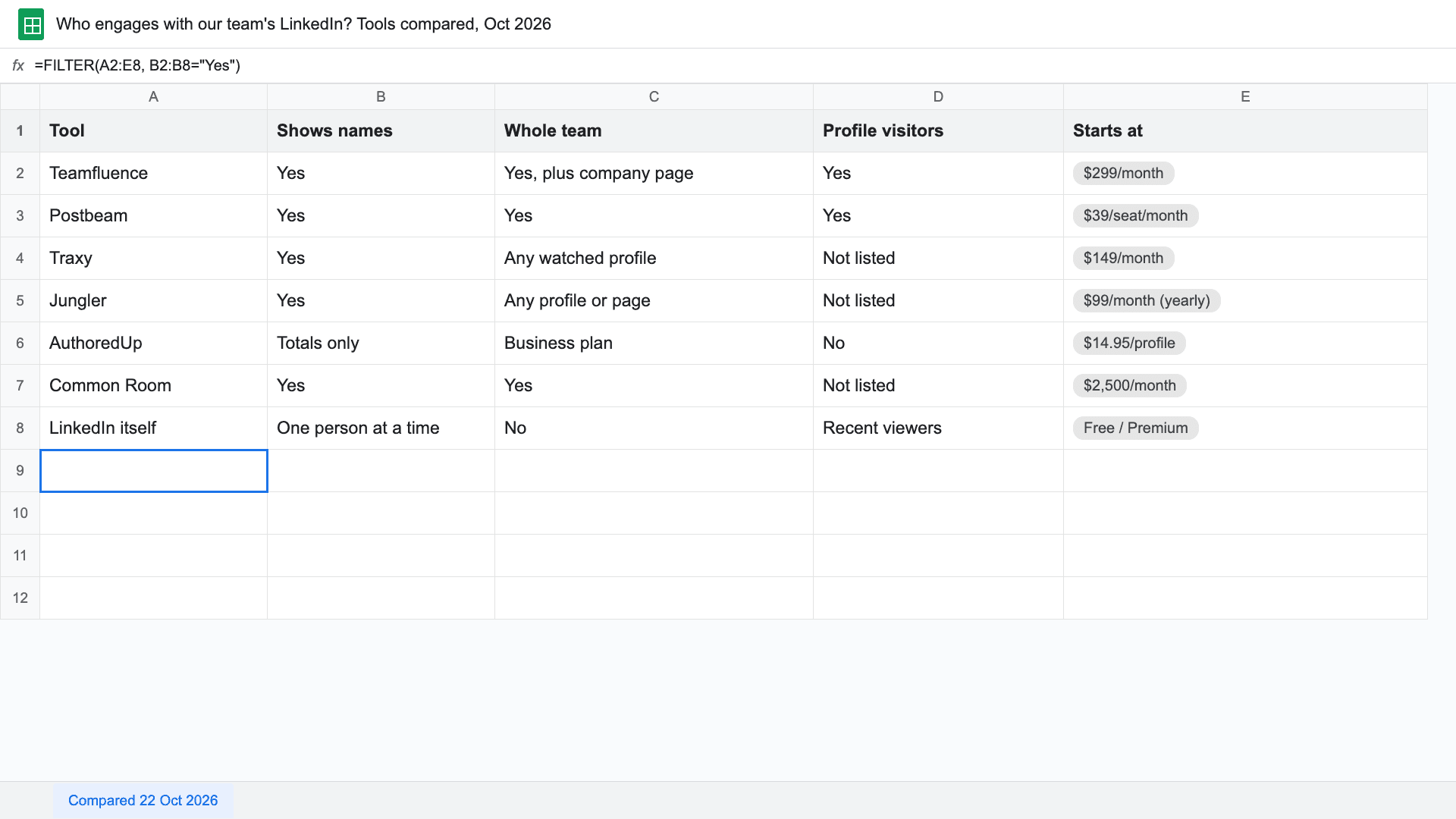
| Shows names | Whole team | Profile visitors | Filter by ICP / accounts | CRM | Starts at | |
|---|---|---|---|---|---|---|
| Teamfluence | Yes | Yes, plus company page | Yes | ICP score + target account list | HubSpot, Salesforce, Slack, webhooks, API | $299/month (pricing) |
| Postbeam | Yes | Yes | Yes | ICP filters | Export to HubSpot, Salesforce, CSV | $39 per seat/month (2+ seats) |
| Traxy | Yes | Watchlist of any profiles | Not listed | ICP match score | Not listed | $149/month |
| Jungler | Yes | Any profile, page or keyword search | Not listed | Not listed as a filter | Clay, Slack, sequencers, webhooks | $99/month (yearly billing) |
| AuthoredUp | Not listed (aggregate analytics) | Team dashboard on Business plan | No | No | No | $14.95 per profile/month (3+ profiles) |
| Common Room | Yes (across many sources) | Yes | Not listed | Yes | Yes | $2,500/month, billed annually |
| LinkedIn itself | Yes, one person at a time | No | Recent viewers (more with Premium) | No | No | Free / Premium |
"Not listed" means the company's own site doesn't say, as of 22 October 2026. It may still exist: ask them.
1. Teamfluence: for teams where several people post
Teamfluence collects engagement across your whole team in one workspace: likes, comments, profile visitors, new connections, followers on personal profiles and the company page, and people who engage with your thought-leadership ads.
Then it decides who matters, three ways: you review by hand, an AI agent scores each person 1 to 5 against your ideal customer and writes one line on why, or you upload your target accounts and only those companies count.
Qualified people go to HubSpot, Salesforce, Slack, a webhook, your sequencer or your AI agent (API and MCP). Each one carries what they did and when, so the rep has a reason to reach out.
- Best for: founder-led B2B teams, marketing teams that need to show content creates pipeline, ABM teams working a target account list, and executive branding agencies (one workspace per client).
- Less suited if: you mainly want to watch posts from people outside your team across the whole network, or you need a built-in email sequencer.
- Price: from $299/month for 500 qualified leads; $499/month for 1,000 (pricing). You pay for qualified leads, not seats.
2. Postbeam: if you also want help writing the posts
Postbeam drafts LinkedIn posts in each person's voice, schedules them, and tracks who engages: "every like, comment, and profile view is captured and filtered against your ICP" (job title, seniority, company size, industry). Engagers export to HubSpot, Salesforce or CSV.
- Best for: teams that don't post much yet and want writing, scheduling and engagement in one tool.
- Less suited if: you need a live CRM sync rather than an export, or a target account filter.
- Price: $49/month for one seat, $39 per seat/month with two or more, 7-day free trial (postbeam.ai).
3. Traxy: if you want to watch the whole market
Traxy tracks posts from any profile you add to a watchlist (yourself, competitors, creators, industry voices) and finds leads in the engagement. A discovery agent also scans engagement across your market every hour and ranks people by ICP fit.
- Best for: teams that want leads from competitors' and creators' audiences, not only their own.
- Less suited if: profile visitors or a CRM push matter to you: neither is listed on its site.
- Price: Pro $149/month (5,000 credits); Scale from $299/month; 7-day free trial (traxy.ai/pricing). One qualified engagement costs one credit; enrichment costs more.
4. Jungler: if your stack runs on Clay
Jungler captures likes and comments on any profile, company page or keyword search you choose, enriches each engager (work email, company size, industry, title, seniority) and delivers them to Clay, Slack, Google Sheets, HeyReach, lemlist, Instantly, Smartlead or a webhook.
- Best for: Clay-centric outbound teams who want raw engagers in their own workflow.
- Less suited if: you want qualification and the CRM handled for you: no CRM is listed, and Jungler doesn't list an ICP filter.
- Price: Starter $99/month (yearly billing, 5 signals), Discovery $199, Growth $299; 7-day free trial (jungler.ai/pricing).
5. AuthoredUp: for writing and post analytics
AuthoredUp is a LinkedIn editor and analytics tool: formatting, drafts, scheduling, a content calendar, and analytics on reactions, comments, reposts and impressions. The Business plan adds one dashboard across every member's profile and your company pages.
- Best for: teams that want to write better posts and see which ones perform.
- Less suited if: you need the names of the people who engaged: its pricing page describes analytics in totals, not people.
- Price: $19.95/month for one profile; Business $14.95 per profile/month (3+ profiles) (authoredup.com/pricing).
6. Common Room: for enterprise signal programs
Common Room pulls signals from CRM, product, website, intent data and "social & community engagement" into one place for GTM teams. Its site doesn't name LinkedIn specifically on the pricing page, so ask which LinkedIn signals are covered.
- Best for: larger revenue teams combining many signal sources ("teams of 50 to 1,000+ reps", per its site).
- Less suited if: you're a small team, or LinkedIn engagement is the main signal you need.
- Price: Essential $2,500/month billed annually; Advanced and Enterprise on request (commonroom.io/pricing).
7. LinkedIn itself: free, one person at a time
You don't need a tool to see who engaged with one post: click the reactions and comments under it. And everyone sees some of their own profile viewers. LinkedIn's help pages say basic accounts see the most recent viewers from the last 90 days, while Premium subscribers see viewers, trends and insights for up to 365 days (LinkedIn Help). People browsing in private mode stay hidden, for every tool on this list too.
- Best for: one person checking their own week.
- Less suited if: you want a team view, a filter, or an export. Each person sees only their own posts and profile, and nothing goes to your CRM.
How to choose
- Several people post and sales should follow up: Teamfluence.
- Your team barely posts yet: Postbeam, then add tracking once the posting habit sticks.
- You want competitors' and creators' audiences: Traxy or Jungler.
- You run outbound from Clay: Jungler.
- You only want better posts: AuthoredUp.
- You're 50+ reps with many signal sources: Common Room.
Can you do it by hand?
For a week, yes. Here's the 20-minute version for one person:
- Open their last 10 posts and list everyone who liked or commented.
- Add the people from their "Who's viewed your profile" page.
- Write the job title and company next to each name.
- Mark who works at a target account, and who came back more than once.
It stops working when five people post every week. That's the point where a tool pays for itself.
FAQ
Can I see who engages with my coworker's posts? On a single post, yes: reactions and comments are visible to anyone who can see the post. Profile visitors are visible only to the person whose profile it is. That's why team tools exist: each person connects their own account.
What's the difference between engagement analytics and engagement tracking? Analytics tells you how a post performed: impressions, reactions, comment counts. Tracking tells you who engaged, by name, so you can act on it. AuthoredUp is analytics; Teamfluence, Postbeam, Traxy and Jungler track people.
Which signals matter most? Repeats. One like is noise. A like, then a profile visit, then a company page follow in the same week is someone paying attention. That's who we'd call first.
How do I get engagers into HubSpot or Salesforce? Push only the people who pass a check, update the record each time they engage again, and check for duplicates. Step by step: HubSpot, Salesforce.
What happened to Trigify? Trigify closed on 22 October 2026 after its team joined HubSpot. If you used it to see who engages with posts, the tools above cover that. More in Trigify alternatives.
See it on your own team
If several people on your team post and you want to see who engages, by name, filtered to your buyers: talk to sales and we'll show it on your own team's data.
Related: How to find warm intros into your target accounts · Trigify alternatives · Warm vs cold outreach