

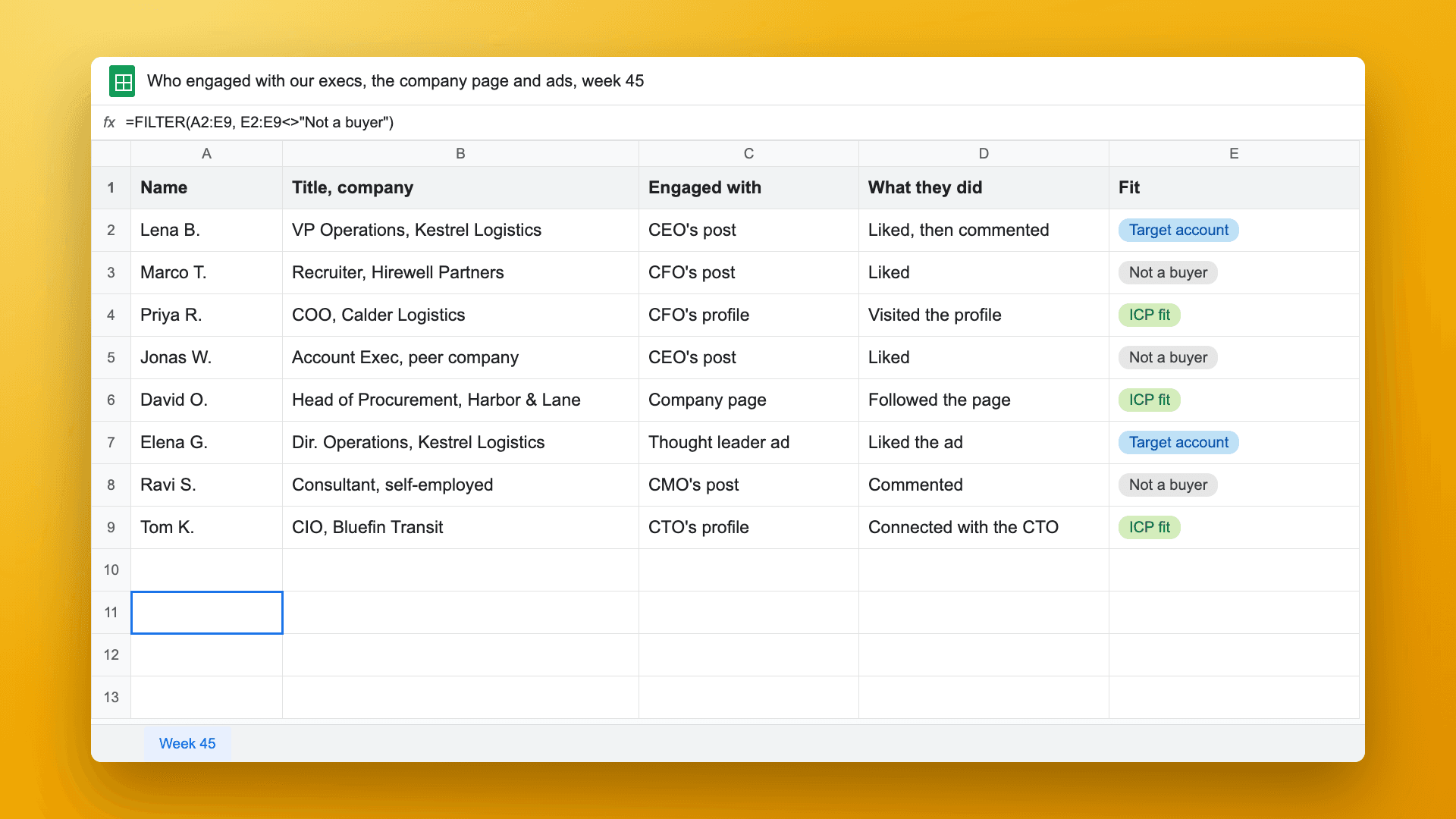
Short answer: A corporate influencer program turns into pipeline when you collect names instead of counting reach. Put everyone who engages with your executives' posts and profiles, your company page and your thought leader ads into one list. Keep the people who fit your ICP or work at a target account. Have the executive whose post they engaged with connect with them, give the account to sales, and save the post as the source in your CRM, so you can follow it to MQLs and SQLs. Teamfluence does the collecting, qualifying and CRM push for the whole executive team at once.
Last updated: 6 November 2026
Last week I had a sales call with the marketing team of a software company that sells to the public sector. Their CEO and the rest of the C-level post on LinkedIn every week. They call them their corporate influencers. A content lead writes most of it, the company page shares it, and some posts run as ads.
I asked what they measure. The content lead said:
"The main KPI is impressions. So reach and then I personally also look into engagement as well, because we all know that's the one that pushes the reach."
The CEO watches the follower count. And the company page follower growth was dropped as a goal this quarter, because it slowed down on its own.
Then the head of marketing described what they actually want:
"The post that [our content lead] created, for example, the engagement that came out of these were XYZ people, our sales reach out to them. We were able to qualify them, we were able to get SQL, MQLs. That would be the ideal stage."
That's the whole gap. They have the reach. They don't have the next step. This post is how I'd set up that next step.
What is a corporate influencer program?
It's a program where a company's executives post on LinkedIn under their own names, as part of the company's marketing. Usually marketing runs it: a content lead writes or edits the posts, the company page reshares them, and the best ones get boosted as thought leader ads.
It's the multi-person version of founder-led content. One founder posting is a person. Five executives plus a company page plus ads is a channel, and a channel needs reporting.
Why do most programs report impressions and followers?
Because those are the numbers LinkedIn gives you.
Each executive sees their own post analytics. The company page admin sees the page analytics. The ads team sees Campaign Manager. Nobody sees one list of the people who engaged across all of it, so the program gets reported in the units that are easy to add up: impressions, reactions, followers.
Those numbers aren't useless. Reach is what makes the rest possible, and engagement pushes reach. But they can't answer the question a head of sales asks: which of these people should we talk to?
What do LinkedIn's own reports show you?
More than most people think, and less than you need for pipeline. Here's what each one gives you, from LinkedIn's help pages (checked 30 Oct 2026):
| Where | What it shows | Names? | Covers the whole team? |
|---|---|---|---|
| Post analytics | Impressions, reactions, "In network" vs "Out of network" reach, viewer demographics (kept 180 days) | No, demographics are grouped | No, one person's posts |
| Post analytics, profile views | Members who viewed your profile within the first month after the post | Yes, for that person | No |
| Profile viewers | Free: the three most recent viewers in the last 90 days. Premium: the full list, up to 365 days | Yes, unless they browse privately | No, each person sees their own |
| Companies Hub (Campaign Manager) | Which companies engage with your organic and paid content, sortable, exportable to CSV | No, company level | Company page and ads, not your executives' own posts |
If you run ads, Companies Hub is the best of these for account-level reporting, and it's free with Campaign Manager. The team I spoke to does something similar already: they take the companies that engage with their ads, pull them into Clay, look up people with the right job titles and start outreach.
That works for ads. It misses the people who engaged with the CEO's own posts, visited the CFO's profile, or followed the company page. Those are named people who already raised their hand, and no report puts them in one place.
How do you turn a corporate influencer program into pipeline?
Five steps. The first two are about the list, the last three are about what happens to it.
1. Collect everyone who engages, from every executive, in one list. Likes, comments, profile visitors, new followers and new connections for each executive, plus the company page and your thought leader ads. Tag each person with what they did, on whose profile or post, and when. Without the tag you can't do step 5.
2. Keep the people who fit. Most engagers aren't buyers. Peers, recruiters, competitors and friends like executive posts all the time. Qualify each person twice: does the person fit (role, seniority, department) and does the company fit (size, industry, or on your target account list). I wrote up how to qualify the people who like your posts in more detail.
3. Let the executive make the first move. The head of marketing on the call already had this idea: use the CEO's profile as the introduction point. If someone at a target account liked the CEO's post twice, a connection request from the CEO is a natural next step. It's warmer than a cold email from a rep, and it doesn't sell anything yet.
4. Hand the account to sales, with the context. Once there's a connection or a second signal, the account owner reaches out. The first line is what the person engaged with, said as timing, not as "I saw you liked our post."
5. Save the post as the source in your CRM. When the person lands in HubSpot or Salesforce, the record carries the post or profile they engaged with. Now you can report the program the way the head of marketing wanted: this post, these people, these conversations, these MQLs and SQLs. Here's how to push LinkedIn engagers into your CRM.
Who does what in a corporate influencer program?
| Who | What they do | What they get back |
|---|---|---|
| Content lead | Writes and edits the posts, picks which ones to boost | Which posts brought ICP people, not just reach |
| Executives | Post, and connect with the qualified people who engaged with them | A short list of people worth connecting with, instead of every notification |
| Marketing ops | Sets the ICP and the target account list, connects the CRM | One list across all executives, the page and ads |
| Sales (AEs, SDRs) | Reach out once there's a connection or a second signal | The person, the account and what they engaged with |
The content lead is the person most programs forget. They do most of the work and get reported on impressions. Show them which posts brought the people sales wanted, and the next post gets better.
How do you attribute pipeline to a post in your CRM?
Attribution only works if the source is saved at the moment the person enters the CRM. Adding it later, by hand, doesn't happen.
So the record needs three things when it's created:
- The person and their company, matched to an existing contact and account if they're already there.
- What they did (liked, commented, visited a profile, followed the page) and on which executive's post or profile.
- The date.
From there it's normal CRM reporting. Filter contacts by source post, follow them to opportunities, and compare executives and topics by the pipeline they started, not by their impressions. If you use Salesforce, I explained what lands in Salesforce and how. For HubSpot, see the HubSpot version.
How does Teamfluence run this for a whole executive team?
This is what Teamfluence does. Each executive connects their account once. From then on, the people who like and comment on their posts, visit their profiles, follow them or connect with them land in one list, together with your company page followers and ad engagers. Every person carries what they did, where and when.
Teamfluence then scores each person against your ICP and your target account list, and sends the qualified ones to HubSpot, Salesforce, Slack, your sequencer (by webhook) or your AI agent. Seats are unlimited, so you add the whole C-level and your content lead without paying per person. You pay for leads, not seats. See pricing.
What it doesn't do: write the posts, or replace your sequencer. The executives still post, and your sequencer still sends.
FAQ
What's the difference between a corporate influencer program and employee advocacy?
Employee advocacy usually means many employees resharing company content. A corporate influencer program is a smaller group, often the C-level, posting their own content under their own names. The reporting problem is the same: engagement is spread across many profiles.
Should the company page or the executives post?
Both, for different jobs. On the call I described here, the executives' posts carried most of the reach and the company page growth had slowed. Track both in the same list, so you can see which one brings the people you want.
Do thought leader ads count as part of the program?
Yes. When you boost an executive's post, the people who engage with the ad are as relevant as the organic engagers. Keep them in the same list and tag them as ad engagers.
How long until the program shows pipeline?
It depends on your sales cycle. What you can see in the first weeks is how many ICP people and target-account people engage each week, and which executives and topics bring them. That's the leading number to report while pipeline catches up.
Can we do this without a tool?
For one or two executives, yes: each one copies their profile viewers and post engagers into a shared sheet every Monday. I wrote that routine up in how to see who viewed your sales team's LinkedIn profiles. It breaks once you have five executives, a company page and ads.
See it on your executives' posts
If your executives post every week and you report on impressions, talk to us. We'll show you who engaged with them last month, by name, and which of them fit your ICP.