

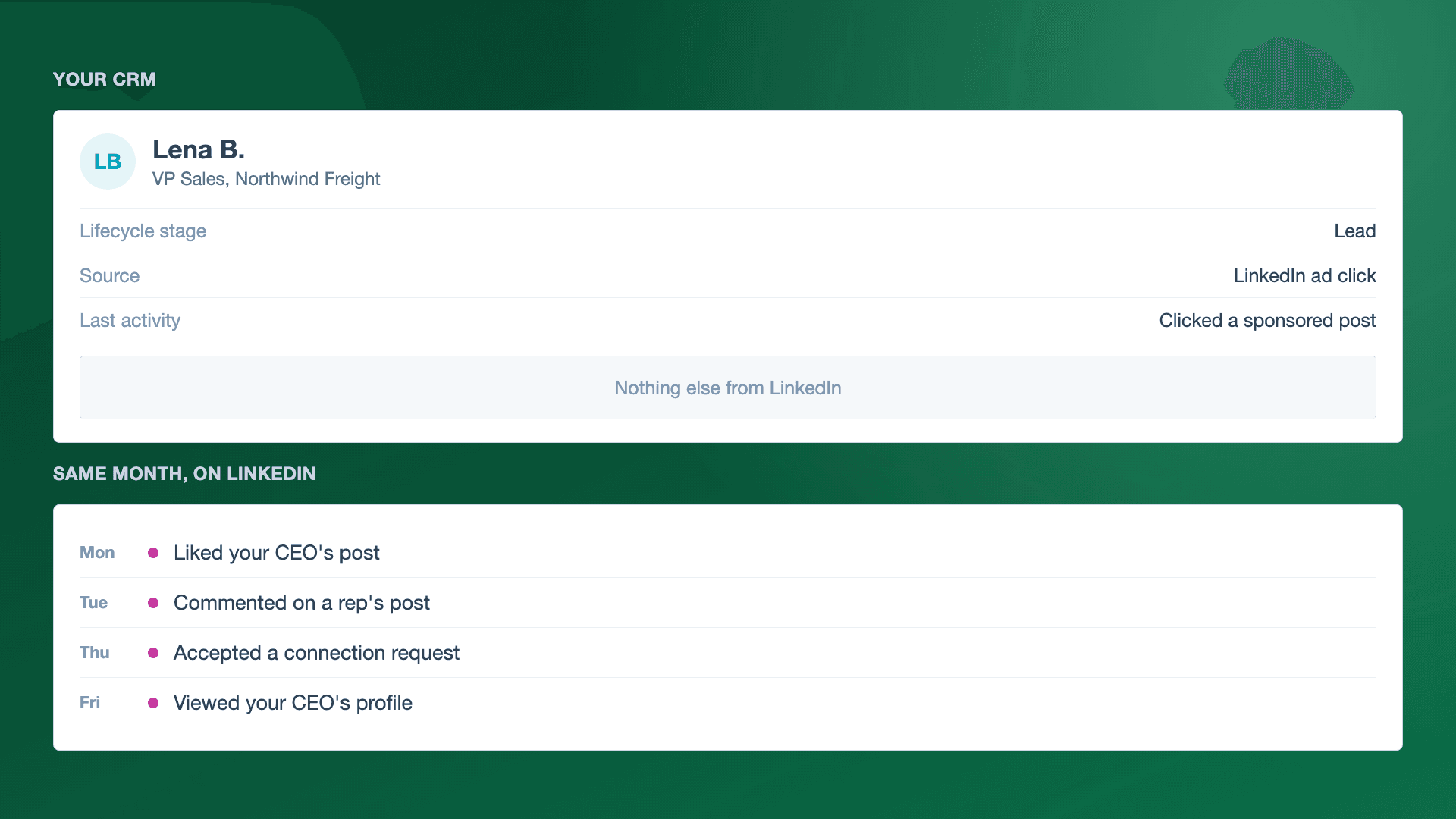
Short answer: The native LinkedIn to CRM connections are built for ads. HubSpot's LinkedIn Ads integration syncs leads from the ad accounts you pick and can track contacts who interact with your ads. A like, comment or accepted connection on your CEO's or your sales team's posts doesn't come from an ad account, so nothing picks it up and the contact record stays empty. To attribute organic LinkedIn to deals, collect those people by name, match them to the contacts you already have, and write each engagement on the contact with a link to the post. Teamfluence does that for the whole team and pushes it to HubSpot or Salesforce.
Last updated: 19 Nov 2026
Earlier this month we had two calls with the marketing lead of a consultancy that helps nonprofits raise money. His marketing team runs the LinkedIn accounts of four people plus the company page. They also run LinkedIn ads. HubSpot is where marketing reports on how somebody found them.
On the first call he described the gap:
"with paid advertisements... we can tie that activity back to their contact in HubSpot... but we are not able to do that with organic activity."
And a bit later:
"when somebody comments, likes, reposts, connects with somebody on LinkedIn, we're not capturing that data and therefore not able to tie it back to attribute it to a deal. And that is something I'd like to fix."
What he wanted was a way to show that the posts his team writes every week help the deals sales closes. We hear this a lot from marketing teams who run founder-led content or a corporate influencer program.
What does the LinkedIn to HubSpot integration actually sync?
When you connect LinkedIn Ads to HubSpot, you pick the ad accounts to sync leads from. HubSpot's help page also says that if you want to track contacts who interact with your ads, you leave the auto tracking switch on (HubSpot: Connect your LinkedIn Ads account to HubSpot, checked 9 Nov 2026).
That page is about ad accounts, leads from your forms and contacts who interact with your ads. It doesn't mention organic posts, personal profiles or connection requests.
So when someone fills in your Lead Gen Form, the contact shows up. When someone who is already a contact clicks your ad, HubSpot can log it. Our customer put it simply on the onboarding call:
"I don't think we have all of the data we could from paid ads... just the LinkedIn to HubSpot native integration."
Mara from our customer success team told him the same thing from the other side: the native integration is about as much ad data as you can get.
If you want the full list of what syncs natively today (Lead Gen Forms, ads tracking, Sales Navigator, Zapier), we wrote it up in how to push LinkedIn engagers into your CRM.
Why don't likes on your team's posts reach the contact?
Because they happen somewhere the integration doesn't look. Your CEO's post lives on your CEO's profile. Your AE's post lives on your AE's profile. There's no ad account behind them, no form and no tracking switch.
Even for ads, what LinkedIn reports in Campaign Manager about who engaged is grouped. The demographics report shows results by company, job title, seniority, industry and location. Those numbers are approximate, and small groups are hidden (LinkedIn Help: demographics reporting). That helps you check you reached the right kind of people. It doesn't give you names to put on a contact.
So the CRM ends up with a strange picture. The person who clicked one ad last month has a LinkedIn touch on their record. The person who liked several of your founder's posts, accepted a connection from your head of sales and then booked a call through your website looks like they came from nowhere.
What's the difference between marketing-caused and marketing-influenced?
On the onboarding call, our customer explained how his team wants to report. A marketing-caused client is the obvious one: they downloaded an ebook, then became a lead. A marketing-influenced client is harder to see:
"I wanna be able to say, 'This person came in because they know this guy' but in the last six months they did all of these things on LinkedIn that helped the conversation."
I like this framing because sales keeps the credit for the relationship that brought the deal in. Marketing just wants the six months of LinkedIn activity before it to be visible on the same record.
Steven, our CEO, has a short way to say why this matters: likes don't pay the rent. A like only counts when you can connect it to a person who fits your ICP and, later, to a deal.
Steven is also skeptical of first-touch attribution for LinkedIn. His view is that how you follow up and how you introduce yourself matter more than which post someone saw first. That's another reason to keep the full history on the contact instead of one source field.
What reaches your CRM by default, and what doesn't?
| LinkedIn activity | Reaches HubSpot through the native ads integration? | What you need instead |
|---|---|---|
| Lead Gen Form submission on an ad | Yes, from the ad accounts you select | Nothing extra |
| A contact interacting with your ad | Yes, if auto tracking is on | Nothing extra |
| Who engaged with an ad, by company or job title | No, it stays in Campaign Manager, approximate and grouped | Names, if you want to act on it |
| Like or comment on a teammate's post | Not covered by HubSpot's page | A tool that collects engagers by name |
| Accepted connection request | Not covered | Same |
| Someone viewing a teammate's profile | Not covered | Same, plus the profile owner's own view |
| Engagement with your company page | Not covered | Same |
Sources: HubSpot Knowledge Base and LinkedIn Help a424171, both checked 9 Nov 2026.
How do you get organic LinkedIn engagement into your CRM?
This is the setup we walked through with this customer. It works the same in HubSpot and Salesforce.
- Decide which profiles count. Usually the founder or CEO, the people in sales, any other executive who posts, and the company page. Our customer started with four people and the company page.
- Collect the people by name. Everyone who likes, comments, reposts, follows, views a profile or accepts a connection, across all of those profiles.
- Qualify before you push. Most engagers are colleagues, friends and old coworkers. Our onboarding lead's advice on the call was to filter by ICP for the first three weeks, because the team had never watched their organic activity before. See how it looks, then decide what to send.
- Match to contacts you already have. Our customer asked exactly this: will it create new contacts, or find the contact that's already there and add the activity? You want the second. Match on name, LinkedIn profile and email, and only create a contact when nobody matches. The match won't be perfect every time, so check the first batch.
- Write the engagement on the contact. The type of interaction (post engagement, new connection, company page engagement) and a link to the post. When the same person engages again, the record updates.
- Report on the deal, looking back. When a deal opens, look at the LinkedIn activity on its contacts over the last six months. That's the marketing-influenced view our customer wanted.
Two notes from the onboarding. Our customer said, "I don't really want it deleting." Pushing engagement should only add data to a contact, never remove anything. And if a lead has no email yet, push it anyway, so it can still match on the LinkedIn profile.
For the HubSpot specifics, see HubSpot LinkedIn integration. For Salesforce, see Salesforce LinkedIn integration.
How does Teamfluence fill the gap?
Teamfluence tracks the people who engage with your team on LinkedIn: when someone likes or comments on a post, connects with someone on the team, or engages with your company page or ads. It works across every person on the team at once, and seats are unlimited.
You qualify the people in one of three ways: by hand, with an AI agent that scores each person 1 to 5 against your ICP and gives a reason, or by matching them to your target accounts. Qualified people go to HubSpot or Salesforce with their engagement history, or to CSV, Slack, webhooks, the API or MCP.
You pay for leads, not seats. See pricing.
What it doesn't do: it doesn't replace your ad reporting in Campaign Manager, and it doesn't send sequences.
FAQ
Does LinkedIn sync organic post engagement to HubSpot?
HubSpot's help page for the LinkedIn Ads connection covers leads from your ad accounts and contacts who interact with your ads. It doesn't mention organic posts or personal profiles (HubSpot, checked 9 Nov 2026).
Can I see who engaged with my LinkedIn ads by name in Campaign Manager?
Campaign Manager shows engagement by company, job title, seniority, industry and location. The numbers are approximate and small groups are hidden (LinkedIn Help a424171). For names, see how to see who engaged with your thought leader ads.
Will pushing LinkedIn engagers create duplicate contacts?
It shouldn't if you match first. Look for an existing contact by name, LinkedIn profile and email, and only create one when there's no match. Check the first batch by hand.
Should every like go into the CRM?
No. Filter by ICP or target account first. A CRM full of your team's friends makes the attribution report worse.
How far back should I look when I report influence?
Our customer chose six months before the deal. Pick a window that matches your sales cycle and keep it the same every quarter.
See your team's LinkedIn activity in your CRM
If your ads show up in HubSpot and your team's posts don't, we can show you what the missing half looks like on your own accounts. Talk to us.