

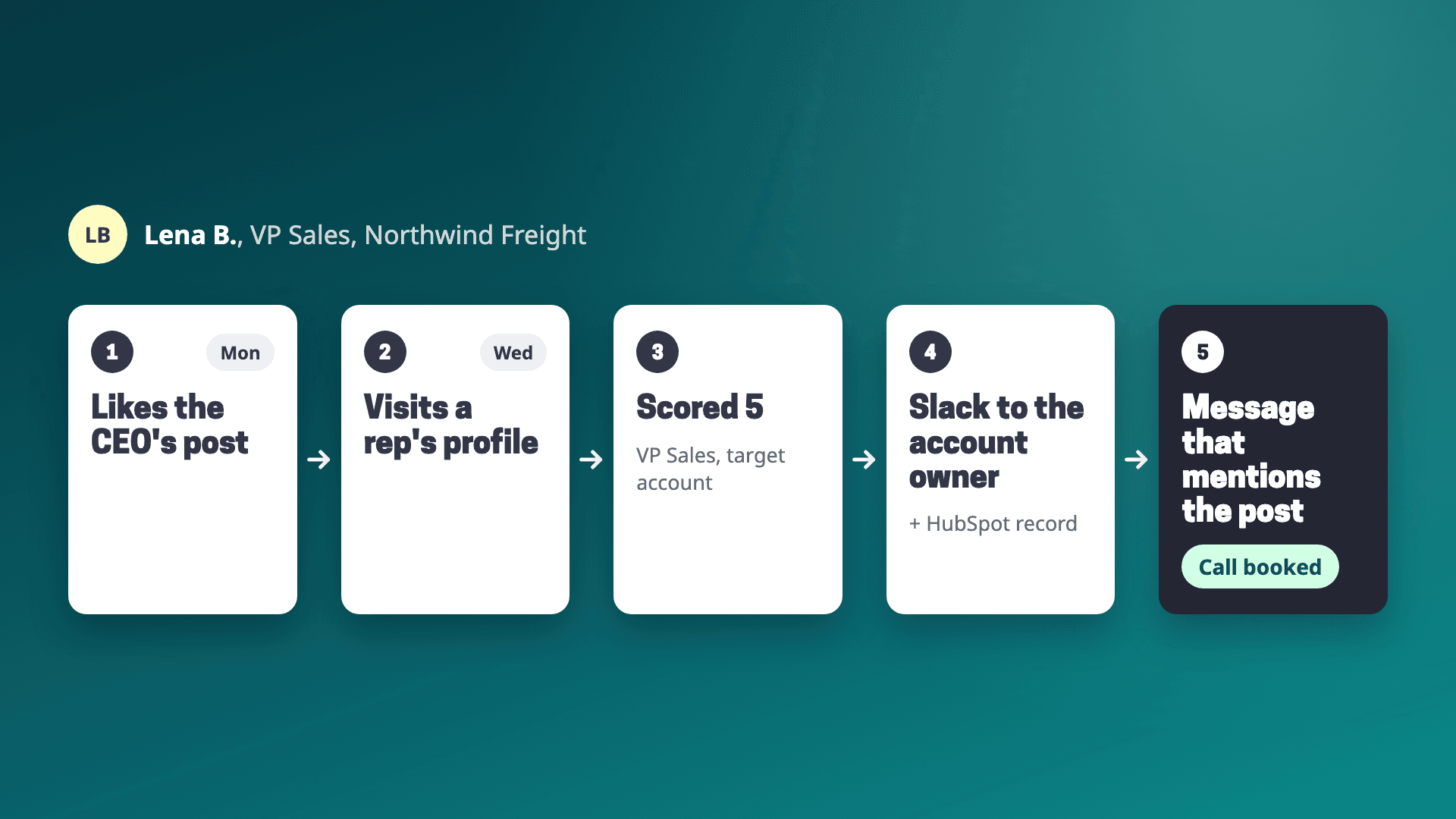
Short answer: Collect everyone who engages with your team's posts and profiles in one list, keep only the people who fit your ICP or work at a target account, and wait for a second signal before reaching out unless they're a strong fit. Send each one to the person who owns the account, with what they did and when. That person reaches out within a few days, about their work and the topic of the post. Teamfluence does the collecting, scoring and routing for your whole team and company page, and sends qualified people to HubSpot, Salesforce, Slack or your sequencer. Your team does the reaching out.
Last updated: 4 November 2026
A founder of a two-person B2B agency told us on a call that he'd been posting on LinkedIn constantly for three months. His posts got tens of thousands of views and brought in one client. When we asked what happened with the people who engaged, he said: "I don't track who gives me like, who starts following me, who comments, whatever."
The attention was there. Nothing connected it to a meeting.
This guide is that missing part, step by step: why engagement stalls, the path from a like to a booked call, what the first message says, who sends it, and how to tell if it's working. Every LinkedIn and competitor fact links to their own pages, checked on 27 October 2026.
Why doesn't post engagement turn into leads on its own?
Usually for three reasons.
Each signal lands with one person. When a buyer likes your CEO's post, the notification goes to your CEO. When the same buyer visits a sales rep's profile two days later, that rep sees it, if they check. Nobody sees both.
Most of the people engaging won't buy. Colleagues, peers, recruiters, friends. Buyers are a few names in the list, and most of them engage silently: they read, visit a profile, follow the page, and never comment.
Nobody owns the follow-up. Marketing reports reach. Sales works its own list. The person who liked three posts this month falls between them.
LinkedIn gives each person some of the raw material, for their own account only. Post analytics count reactions and list "members who viewed your profile within the first month after your post was published" (LinkedIn Help), plus viewer demographics that describe your audience as a group (LinkedIn Help). Profile viewers are visible only to the profile's owner: a free account lists the three most recent viewers from the last 90 days, and Premium shows the full list for up to 365 days (LinkedIn Help). None of it adds up across a team.
What are the steps from a like to a booked meeting?
Six steps. Steps 2 and 4 have their own guides, so here they're short.
1. Collect engagement from everyone who posts. Likes, comments, profile visits, new connections and follows, across your founders, execs, reps and the company page, in one list. A buyer may like the CEO's post on Monday and visit a rep's profile on Wednesday. That pattern only shows when it's all in one place.
2. Qualify. Take out employees, customers, competitors and recruiters. Then check ICP fit and target accounts, and score each person. The four checks and a 1 to 5 score are in how to qualify people who like your LinkedIn posts.
3. Decide who to contact now and who to watch. A strong fit at a target account is worth a message after one signal. A decent fit with one like goes on a watch list until they do something else: a comment, a second like, a visit to someone's profile, a company page follow. A marketing lead at a mobility company told us why: "I'm reaching out because you've liked one post ... Because if he reacts to three posts, it's way better than one. And usually it's only one, so it's always a bit weak as well." Our ranking of LinkedIn engagement signals helps you decide which ones count.
4. Route each person to an owner. If the company is already in your CRM, the account owner gets it. If not, assign it by territory or by who they engaged with. Put it where that person already works: the CRM record, a Slack message, a list in your sequencer. Setting that up is in how to push LinkedIn engagers into your CRM.
5. Reach out with context. One message, about them, sent by someone they've seen. More on this below.
6. Log the outcome. Did they reply? Did it become a meeting? Track it in your CRM, next to the post that started it. That's how you find out which posts bring buyers and which only bring likes.
What should the first message say?
Something about them. Skip the thank-you for the like. The same founder from the agency put the usual version bluntly: "you cannot ... send a connection request and after one day, hey, do you want a free audit of whatever ... for me it didn't even work well three years ago, but now it doesn't work at all."
What works better is what a customer on a B2B company's GTM team called "a very simple follow-up that would actually turn into a conversation starter." Three examples, by signal (the people are fictional):
| What they did | Example opener |
|---|---|
| Commented on your CEO's post about hiring a first sales rep | "Saw your point about hiring someone who's sold before over someone who knows the market. Is that what you went with at Northwind?" |
| Liked a post, then visited a rep's profile | "Saw you're hiring dispatchers in Rotterdam. Anna wrote about onboarding new drivers last week, and it's a question freight teams keep asking us. How are you handling it?" |
| Works at a target account, followed the company page | "Your team came up when we were looking at companies moving off spreadsheets for dispatch. Would a short look at how others did it be useful?" |
A few rules that hold for all three:
- Don't mention the like or the visit. People know they engaged. Saying it makes the message about your tracking.
- Mention the topic of the post. It's the one thing you know they cared about this week.
- Ask one question. A meeting request in the first message works when they're a target account with a clear need, rarely otherwise.
- If they commented, read the comment first. It often tells you what to say.
Who on your team should reach out?
Usually the person whose post they engaged with. They've already seen that name and face, so the message doesn't arrive cold. If that person is the CEO and doesn't do outreach, the rep can still mention them: "Our CEO wrote about this last week."
The other option is the account owner, when the company is already in your pipeline. Then the engagement tells the rep the timing is good, and the message goes into a conversation that already exists.
The COO of a software company described this switch on a call: "I thought it was like who we're targeting with the campaign, but it's almost the other way around, isn't it? It's like who's engaging with that and then we can Invite them to something or catch up with them on it specifically."
That "invite them to something" is worth keeping. Other moves besides a DM:
- invite them to a webinar or a small dinner on the topic of the post
- send the account owner an intro through someone on your team who knows them (see how to find warm intros into your target accounts)
- add them to an email sequence that references the topic
- comment on their next post before you message them
How fast should you follow up?
Within a few days of the signal, while the post is still fresh for them. A week later, the topic is gone and the message reads like any other outreach. The reasoning is in the 48-hour rule.
That's the main argument for automating steps 1 to 4. Done by hand, the list is ready by Friday and the signals are already old.
Ways to turn LinkedIn post engagement into leads, compared
| Whose engagement | How it qualifies | Who sends the outreach | Where leads go | Starts at | |
|---|---|---|---|---|---|
| By hand | Your own posts and profile, one person at a time | Your judgement | You | A sheet | Your time |
| Clay table (do it yourself) | Engagers you feed in | Columns you build | Your sequencer | Wherever you set up | Your Clay plan + your time |
| Valley | Post engagers, profile viewers, competitor post engagers (listed as signals) | "Checks fit", ICP scoring | Valley, from your connected LinkedIn (email sending is an add-on), with review before sending | CRM (HubSpot named), API, MCP | $199 per seat/month, or $149 billed quarterly |
| Postbeam | Your team's posts and profiles | ICP filters: title, seniority, company size, industry | You, with a pre-drafted opener per engager | Export to HubSpot, Salesforce, CSV | $39 per seat/month (2+ seats) |
| Traxy | Any profile on your watchlist, plus market discovery | 1 credit per engagement qualified against your ICP | Sending platform from 15,000 credits | Slack, Meta Ads, "8+ more integrations" | $149/month |
| Jungler | Profiles, company pages or keyword searches you pick | Not listed as a filter | Your sequencer | Clay, Slack, HeyReach, lemlist, Instantly, webhooks, API | $99/month (yearly) |
| Teamfluence | Your whole team plus company page: likes, comments, profile visits, connections, follows, ad engagement | AI agent scores 1 to 5 against your ICP with a one-line reason, target account list, or by hand | Your team, through your CRM or sequencer | HubSpot, Salesforce, Slack, webhooks (Make, Zapier, n8n), API, MCP | $299/month |
"Not listed" means the company's own site doesn't say, as of 27 October 2026. Sources: joinvalley.co/pricing, postbeam.ai, traxy.ai/pricing, jungler.ai/pricing, teamfluence.com/pricing.
Which one fits:
- You want the tool to write and send the outreach: Valley.
- Your team barely posts yet: Postbeam, which also helps write the posts.
- You want engagers from competitors' and creators' posts: Traxy or Jungler.
- Several people post and sales owns the follow-up in your CRM: Teamfluence.
How do you know it's working?
Count four things every week, by post:
- qualified people (the 4s and 5s)
- messages sent to them
- conversations started
- meetings booked
The first number tells you if the content reaches buyers. The gap between the first and the second tells you if anyone is following up. The last two are the ones your CEO cares about.
Log them in the CRM, so a meeting can be traced back to the post that started it. For a full model of tracing posts to pipeline, signal by signal, see the missing layer between LinkedIn content and pipeline. For the team-level metrics, see social selling ROI metrics.
How does Teamfluence turn post engagement into leads?
Teamfluence does steps 1 to 4. It collects likes, comments, profile visitors, new connections, followers on personal profiles and the company page, and people who engage with your thought-leadership ads, across everyone on your team, in one workspace.
Each person is qualified one of three ways: an AI agent scores them 1 to 5 against your ICP and writes one line on why, your target account list counts on its own, or someone on the team reviews them by hand.
Qualified people go to HubSpot, Salesforce, Slack, a webhook, your sequencer or your AI agent (API and MCP). Each one carries what they did and when, so the rep's first line is already there.
- Best for: B2B teams where several people post and sales owns the follow-up.
- Less suited if: you want one tool to send the messages for you. Teamfluence has no built-in sequencer: leads go to yours.
- Price: from $299/month for 500 qualified leads; $499/month for 1,000 (pricing). You pay for leads, not seats.
FAQ
Is someone who likes my post a lead? Not yet. A like tells you they saw the post. They become a lead when they fit your ICP or work at a target account, and ideally when they've engaged more than once.
Should I send a connection request to everyone who engages? No. Most of them already know you or won't buy. Connect with the people you'd actually call, and add a note about the post's topic.
What if they're already a connection? Then you can message them directly. Check the CRM first: if they're in an open deal, the account owner should know before anyone else reaches out.
Do company page followers count? Yes. A new follower who fits your ICP is one of the clearer signals you get, because it takes a deliberate click. Route them like any other qualified engager.
How many people should one rep follow up with per week? As many as they can write a real message to. If the qualified list is longer than that, raise the bar in step 3 rather than sending templates.
Can I see who engages with my coworkers' posts and profiles? Not in one place. LinkedIn shows each person the analytics for their own posts and their own profile viewers. For a team view, see the best tools to see who engages with your team's LinkedIn posts.
See it on your own team
If several people on your team post and you want the buyers out of that engagement, routed to the right person with a reason to reach out: talk to sales and we'll show it on your own team's data.
Related: How to qualify people who like your LinkedIn posts · How to push LinkedIn engagers into your CRM · LinkedIn engagement signals, ranked