

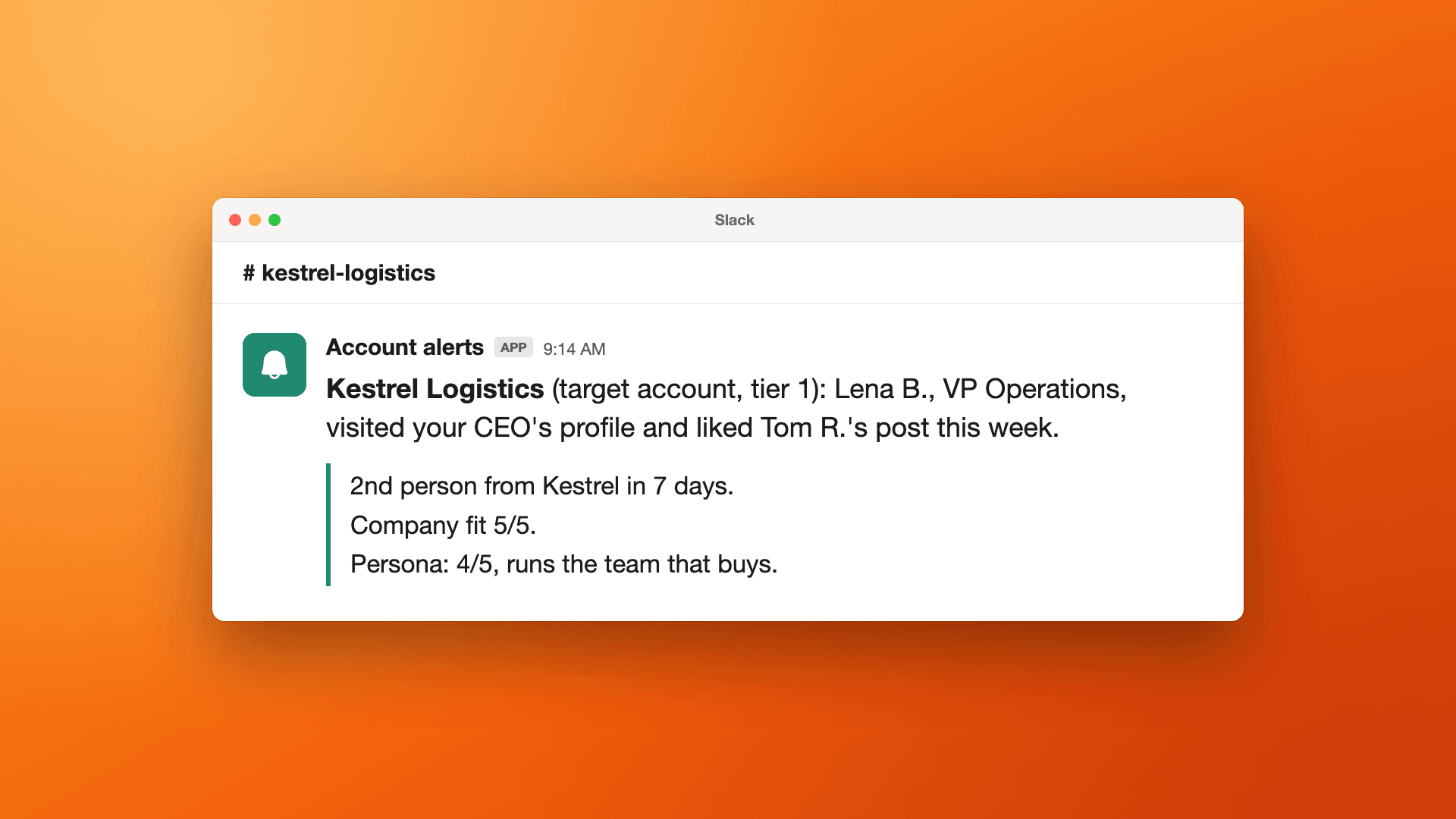
Short answer: LinkedIn has two built-in ways to track target accounts, and both stop short of your team. Campaign Manager's Companies Hub shows which companies engage with your ads and your company Page, by company, without names. Sales Navigator's Buyer Intent shows when buyers show interest in your company, one seller license at a time. Neither gives you one list of the people at those accounts who like your CEO's posts or visit your reps' profiles. To see that, upload your target account list to a tool that collects engagement from everyone on your team, such as Teamfluence, and send each account owner an alert when someone from their account engages.
Last updated: 3 November 2026
Someone on a 12-person GTM team at a B2B company described their ABM tracking to us on an onboarding call: "We're doing that super manually right now ... using LinkedIn Sales Navigator and then hey, filter target account, hey, who's following the account and using that to reach out."
It works for one rep and twenty accounts. It breaks when five people post, the list has 300 companies, and the buyer who visited your CEO's profile on Tuesday never shows up in anyone's filter.
This guide covers what LinkedIn shows you about your target accounts, what it leaves out, a setup that tracks the people as well as the companies, and the tools that do it. Every LinkedIn and competitor fact links to their own pages, checked on 27 October 2026.
What does LinkedIn show you about engagement from target accounts?
Three things, each from a different product.
1. Companies Hub in Campaign Manager. If you run LinkedIn ads, Companies Hub shows company engagement with "your organic and paid content". It draws on your company lists, the companies your organic and paid content reached, and CRM data if you connect it. You can sort by engagement level, click a company to see its activity, and export to CSV. It needs a Company Page associated with your ad account, and it works at company level: the help page doesn't mention seeing individual people.
What counts as organic? When LinkedIn launched the original Company Engagement Report, it defined organic engagement as interactions with "posts from your organization's LinkedIn Page". Posts from your CEO's or your reps' own profiles aren't mentioned, there or in the Companies Hub help page.
2. Premium Company Page visitors. With a Premium Company Page, admins see who visited the Page: full name, job title and company, subject to each visitor's privacy settings, for up to 365 days. LinkedIn's help page says you "can view up to one new visitor's details each day". That's your company Page only. Your team's own profiles aren't part of it.
3. Sales Navigator. The plans page lists Buyer Intent ("seeing when buyers show interest in your company"), alerts on things like job changes and new content, and a way to upload your book of business "to receive smarter recommendations and timely alerts". Licenses are per seller: $119.99/month for Core and $159.99/month for Advanced.
So LinkedIn can tell you that a target account is warming up, and Premium can name some of the people visiting your company Page. It doesn't give you one list of the people at your target accounts who engage with everyone on your team.
Why isn't company-level tracking enough for ABM?
Because the follow-up goes to a person. "Kestrel Logistics is engaging more this month" helps marketing decide where to spend. It doesn't tell the account owner who to write to, or what to say.
Buyers also engage away from the company Page. They read your CEO's posts, look at the profile of the rep who emailed them, and check the person who'd run their onboarding. Those are personal profiles. Each one is visible only to the person who owns it, in one notification feed, for a few days.
Watch for accounts where more than one person shows up. When a second and a third person from the same company show up in the same week, that's the account worth a call. You only see that if someone puts all your team's engagement in one place and matches it to the account.
What to do once an account lights up (who calls, how fast, what to say) is in our ABM signal management playbook. This post is about getting the signal in the first place.
How do you set up LinkedIn engagement tracking for your target accounts?
Five steps, whether you do it in a sheet or a tool.
- Clean the account list. One row per company, with the LinkedIn Company Page URL. LinkedIn says the Page URL "can help you achieve better match results" when you upload a company list to Campaign Manager, and it helps any tool match people to the right company. If you also run ads, upload the same list there (LinkedIn needs at least 300 rows).
- Track everyone who posts, plus the company Page. Your CEO, founders, sales reps, the people in marketing who post. You can't predict which of them a buyer will read.
- Record who your team already knows at each account. Existing connections and followers at target accounts are your warm routes. How to map them: How to find warm intros into your target accounts.
- Decide which signals reach the account owner. A comment or a profile visit from someone at a target account goes straight to them. A single like can wait for the weekly review. See the next section.
- Review accounts weekly, as well as people. Once a week, sort accounts by how many people engaged and how recently. The accounts with two or more people engaging go to the top of the account owner's week.
Doing this by hand, the weekly routine is: each person who posts copies the names from their reactions, comments and profile viewers into a shared sheet, and someone matches the company column against the account list. The profile viewer part is covered step by step in How to see who viewed your sales team's LinkedIn profiles.
Which signals from a target account should trigger an alert?
Not all of them. If every like from a target account pings the account owner, they stop reading the alerts.
A simple order, weakest to strongest:
- A like on a team member's post. Worth logging, not worth an alert on its own.
- A comment. They chose to say something in public. Alert.
- A profile visit to someone on your team, especially the rep who owns the account or your CEO. Alert.
- A follow of your company Page or a team member's profile. Alert if it comes with any other signal that week.
- A second person from the same account engaging within a week or two. Alert the account owner, whatever the signals were.
Then check the person. Being at a target account settles company fit. It doesn't settle whether this person is in the buying group: an intern liking a post is different from the VP who'd sign. How to judge that quickly is in How to qualify people who like your LinkedIn posts.
What should a target account alert say?
Enough for the account owner to act without opening another tool. For example:
Kestrel Logistics (target account, tier 1) Lena B., VP Operations, visited your CEO's profile on Tuesday and liked Tom R.'s post about carrier onboarding on Thursday. Second person from Kestrel this week (Daniel R., Head of Procurement, followed the company Page on Monday). Already connected on your team: Tom R., account executive.
Four things make it usable: the account and its tier, who the person is, what they did and when, and who on your team already has a way in. The "what they did" line is also the reason to reach out. Nobody has to invent an opening.
Send it where the account owner already works: a Slack message, a task on the CRM record, or both. If the person isn't in your CRM yet, create them there at the same time, so the next engagement lands on the record. How to push LinkedIn engagers into your CRM covers that setup.
Ways to track LinkedIn engagement from target accounts, compared
| What it tracks | Names people | Your team's own posts and profiles | Matches your account list | Where it goes | Price | |
|---|---|---|---|---|---|---|
| LinkedIn Companies Hub (Campaign Manager) | Company engagement with your ads and organic content, plus CRM data if connected | Not listed (company level) | Not mentioned (organic = your company Page) | Yes, company lists | CSV export, saved company lists for ads | Part of Campaign Manager; needs a Company Page linked to the ad account |
| Premium Company Page | Visitors to your company Page | Yes, up to one new visitor's details a day, subject to privacy settings | No, company Page only | Not listed | Not listed | Not listed on the help page |
| Sales Navigator | Buyer Intent, alerts on job changes and new content, your uploaded book of business | Not listed on the plans page | Not listed on the plans page | Book of business upload | CRM sync (Salesforce, HubSpot and more) | From $119.99/month per license (Core), Advanced $159.99 |
| ZenABM | Account-level LinkedIn insights with intent, account scoring, attribution | Not listed | Not listed | Account scoring | HubSpot, Salesforce, Attio, webhooks, API, MCP | From $59/month |
| Shared sheet, by hand | Whatever each person copies in once a week | Yes | Yes, one person at a time | By hand | Wherever you paste it | Free |
| Teamfluence | Likes, comments, profile visitors, new connections, followers (personal profiles and company Page), ad engagement | Yes | Yes, everyone you add, plus the company Page | Yes: target account list, scored 5/5 on company fit | HubSpot, Salesforce, Slack, webhooks (Make, Zapier, n8n), API, MCP | From $299/month (pricing) |
"Not listed" means the company's own page doesn't say, as of 27 October 2026. It may still exist: ask them. Sources: Companies Hub, Premium Company Page visitors, Sales Navigator plans, ZenABM pricing.
How to choose:
- You run LinkedIn ads to your account list: start with Companies Hub. It's already in Campaign Manager. Less suited if you need names or your team's personal posts.
- Your reps live in Sales Navigator: Buyer Intent and alerts help each rep with their own accounts. Less suited if you want one view across the team, or engagement with your posts.
- You want ad engagement tied to pipeline in your CRM: ZenABM. Less suited if most of your engagement comes from your team's organic posts rather than ads.
- Several people on your team post and you want the people at your accounts, by name: Teamfluence. Less suited if you need a built-in email sequencer: leads go to yours.
How does Teamfluence track engagement from target accounts?
Teamfluence collects engagement from everyone you add to a workspace and your company Page: likes, comments, profile visitors, new connections, followers on personal profiles and the company Page, and people who engage with your thought-leadership ads.
You upload your target account list. Anyone from those companies who engages with your team, or is connected to someone on it, is flagged and scores 5 out of 5 on company fit. The question left is whether they're the right persona, and the AI agent answers that: it scores each person 1 to 5 against your ideal customer, with a one-line reason. Existing connections and followers are imported during onboarding, so from the first day you see which of your people already know someone at each account.
Workflows run on any signal you choose, including a target account match. One can send the account owner a Slack message, another can create or update the contact in HubSpot or Salesforce, and a webhook can pass it to Make, Zapier, n8n or your sequencer. Every lead carries what they did and when.
You pay for qualified leads, not seats: a lead counts the first time you move it out of Teamfluence. Plans start at $299/month for 500 qualified leads a month, and $499/month for 1,000 (pricing).
FAQ
Can I see which companies engage with my LinkedIn company Page? Yes, with a Campaign Manager ad account: Companies Hub shows company-level engagement with your organic and paid content. With a Premium Company Page, admins can also see some of the individual people who visit the Page.
Does Companies Hub include my employees' posts? LinkedIn's help page doesn't say. When LinkedIn launched the original Company Engagement Report, organic engagement meant interactions with posts from your organization's Page. To track engagement with your team's own posts, you need each person's notifications or a tool that collects them.
How big does a target account list need to be? To upload it to Campaign Manager for ads, at least 300 rows, up to 300,000 companies (LinkedIn Help). For tracking engagement, size it to what your team can follow up on: the accounts someone owns and would call this quarter.
Should I track accounts or people? Both. The account view tells you where to spend time this week. The person view tells the account owner who to contact and why.
Do I need Sales Navigator to track target accounts? Not for Teamfluence. Sales Navigator helps each rep with their own book of business, and some teams use both.
Can I see which people at target accounts visit my team's profiles? Each profile owner sees their own viewers, and nobody sees people browsing in private mode. To get everyone's viewers in one list, see How to see who viewed your sales team's LinkedIn profiles.
How do target account engagers get into HubSpot or Salesforce? Push the ones who pass a check and update the record every time they engage again. Step by step: HubSpot · Salesforce.
See it on your own accounts
If your team posts and you sell to a target account list: talk to sales and we'll show you which people at your accounts already engage with your team.
Related: ABM signal management playbook · How to find warm intros into your target accounts · Best tools to see who engages with your team's LinkedIn posts