

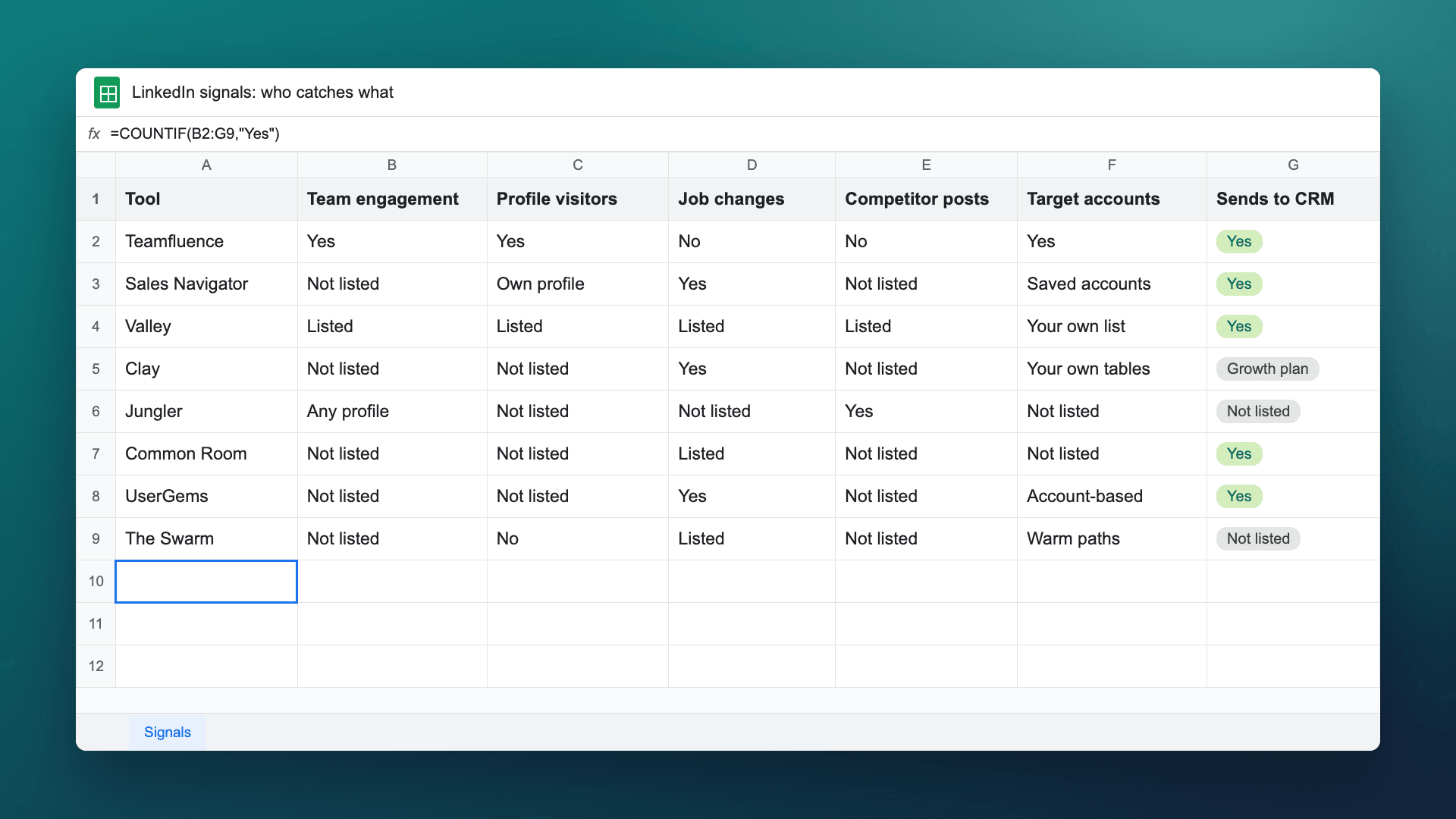
Short answer: The best LinkedIn signal tool depends on which signal you want to act on. Teamfluence catches everyone who engages with your whole team and company page (likes, comments, profile visits, follows, new connections), scores them against your ICP or target accounts, and sends them to HubSpot, Salesforce or Slack. LinkedIn Sales Navigator alerts you when saved leads change jobs or post. Valley turns profile viewers and post engagers into outreach it sends for you. Clay and UserGems cover job changes and company signals. Jungler watches engagement on any profile, including competitors. Common Room combines many signal sources for larger teams. The Swarm maps who on your team knows whom.
Last updated: 11 November 2026
A commercial lead at a consultancy put it simply on a call with us: "A like on a post is one thing, but a profile view is quite a bit different."
He's right, and it's why "LinkedIn signal tool" covers very different products. Some catch people engaging with your team. Some alert you when a buyer changes jobs. Some watch your competitors' audience. Some map who on your team already knows someone at the account. A sales team usually needs one or two of these, not all of them.
This guide sorts the tools by the signal they catch. Every competitor fact and price links to that company's own site, checked on 2 November 2026.
What counts as a LinkedIn signal for sales?
A signal is anything a person or account does that tells you now is a good time to reach out. On LinkedIn, sales teams act on six kinds:
| Signal | What it tells you | Who sees it without a tool |
|---|---|---|
| Engagement with your team's posts | This person is reading what your team writes | The author, one post at a time |
| Profile visits | They looked up someone on your team, often a rep or the founder | Only the profile owner. Free accounts see the three most recent viewers from the last 90 days; Premium sees the full list for up to 365 days (LinkedIn Help) |
| Company page follows | They want to hear from the company | Page admins |
| Job changes | A buyer or past champion just started somewhere new | Their connections, if they notice |
| Engagement on other people's posts | They care about a topic or a competitor | Anyone who opens the post |
| Activity from a target account | Someone at an account you're working is paying attention | Nobody, unless someone puts it together |
The first three are warm: the person came to you. Job changes and competitor engagement are timing signals about people who may not know you yet. Our ranking of LinkedIn engagement signals goes through which ones are worth a message.
Which tools catch which signals?
| Signals it's built on | Profile visitors | Job changes | Target accounts | Where people go | Starts at | |
|---|---|---|---|---|---|---|
| Teamfluence | Engagement with your whole team and company page | Yes, every connected teammate | No | Upload an account list, plus ICP score 1 to 5 | HubSpot, Salesforce, Slack, webhooks, API, MCP | $299/month (pricing) |
| Sales Navigator | Alerts on saved leads and accounts, buyer intent | Your own profile | Yes, saved leads | Saved accounts; buyer intent on Advanced | CRM sync (Salesforce, HubSpot) | $119.99/month per license |
| Valley | Profile viewers, post engagers, competitor engagers, job changes | Listed | Listed | Your own list | Sends outreach itself; HubSpot, API, MCP | $199/month per seat |
| Clay | Job changes, promotions, new hires, company news, social listening | Not listed | Yes | Your own tables | CRM auto-sync on Growth | Free plan (no signals); Launch $185/month |
| Jungler | Likes and comments on any profile, company page or keyword search | Not listed | Not listed | Not listed | Clay, Slack, HeyReach, lemlist, Instantly, webhooks, API | $99/month, billed yearly |
| Common Room | CRM, product, marketing and engagement signals | Not listed | Job-change tracking listed | Not listed | Salesforce, HubSpot, Slack, Outreach | $2,500/month, billed annually |
| UserGems | Job changes, contact-level intent, website visits, M&A, hiring | Not listed | Yes | For account-based teams | Salesforce, HubSpot, Outreach, Salesloft, Gong Engage | $40,000/year list price |
| The Swarm | Who on your team knows whom, colleague overlap, post interactions | No | Listed as a data type | Warm paths into accounts | Clay, API, CSV | Free plan; Premium $99/month per company |
"Not listed" means the company's own site doesn't say, as of 2 November 2026. It may still exist: ask them.
What are the best LinkedIn signal tools for B2B sales teams?
1. Teamfluence: warm signals from everyone on your team
Teamfluence collects everyone who engages with your team in one list: likes, comments, profile visitors, new connections, followers of personal profiles and the company page, and people who engage with your thought leader ads. Most buyers engage silently. They read, visit a profile, follow the page, and never comment, so the quiet signals count as much as the comments.
Then it keeps the ones that matter, three ways: you review by hand, an AI agent scores each person 1 to 5 against your ideal customer with a one-line reason, or you upload your target accounts and see who engages from each one (ABM guide). Qualified people go to HubSpot, Salesforce, Slack, a webhook, your sequencer or your AI agent (API and MCP), each with what they did and when.
If you only need the engagement side, our comparison of tools to see who engages with your team's posts goes deeper on that one signal.
- Best for: B2B teams where founders, execs and reps post, ABM teams working a target-account list, and marketing teams that need to show content creates pipeline.
- Less suited if: your main signals are job changes or engagement on competitors' posts across LinkedIn. Teamfluence works from your own team's activity.
- Price: $299/month for 500 qualified leads, $499/month for 1,000, unlimited seats (pricing). You pay for leads, not seats.
2. LinkedIn Sales Navigator: alerts on the people you've saved
Sales Navigator is LinkedIn's own sales tool. Save a lead or an account and you "get notified when the leads you've saved have important updates, like a job or role change." Relationship Explorer surfaces "job changes and recent LinkedIn posts," and Who's Viewed My Profile shows which prospects looked at yours. On Advanced and Advanced Plus, Buyer Intent shows "which companies are actively showing interest," and TeamLink shows shared connections across your sales team.
- Best for: reps who already work from saved lead and account lists and want job changes and posts from those people.
- Less suited if: you want one list of everyone engaging with your whole team. Its alerts follow the leads and accounts each rep saves.
- Price: Core $119.99/month, Advanced $159.99/month per license; Advanced Plus on request (compare plans).
3. Valley: signals that turn straight into outreach
Valley "finds the people most likely to buy, researches each one and writes outreach." Its site lists plays for LinkedIn profile viewers, post engagers, competitor post engagers and job change alerts. Messages are written in your voice, you approve them, and Valley "runs the sequence across your connected channels."
- Best for: sales teams that want the signal and the first message handled in one place.
- Less suited if: you want reps or account owners to write their own messages and only need the signal list and a CRM push.
- Price: Starter $199/month per seat billed monthly, Plus $299, Growth $499 (joinvalley.co/pricing).
4. Clay: job changes and company signals inside your own workflow
Clay is a data and enrichment platform. From its Launch plan you "get signals on job change, promotions, new hires, company news, and social." Web intent signals, webhook automation and CRM auto-sync start on the Growth plan.
Without signals, teams build this by hand. A marketing ops contractor at a hardware company told us: "We've got a slightly clunky workaround for that using Clay and doing a sort of fortnightly refresh to see if any of the job titles have changed." On Launch and above, Clay sends job-change signals instead.
- Best for: teams with someone who builds and maintains Clay tables.
- Less suited if: nobody on the team owns Clay, or you need the CRM sync on the entry plan.
- Price: free plan without signals; Launch $185/month ($167/month with annual billing); Growth from $495/month; Enterprise on request (clay.com/pricing).
5. Jungler: engagement on any profile, including competitors
Jungler is for "catching prospects engaging with you or your competitors." Each signal "tracks a profile, company page or keyword search," and engagers are enriched with work emails and delivered to Clay, Slack, HeyReach, lemlist, Instantly, a webhook or the API.
- Best for: outbound teams that want leads from competitors' and creators' audiences.
- Less suited if: you want people routed into your CRM: no CRM integration is named on its pricing page.
- Price: Starter $99/month billed yearly (5 signals, unlimited team seats), Discovery $199, Growth $299, all with a 7-day free trial (jungler.ai/pricing).
6. Common Room: many signal sources for larger teams
Common Room "identifies real people" from "every signal across CRM, product, marketing, and engagement." Its pricing page lists job-change tracking, website activity, website deanonymization, and social and community engagement. Its site doesn't name LinkedIn as a source, so ask which LinkedIn signals are covered.
- Best for: revenue teams combining product, website, CRM and community data into one view.
- Less suited if: LinkedIn is the main place your buyers show up and you're a small team.
- Price: Essential $2,500/month billed annually (5 seats); Advanced and Enterprise on request (commonroom.io/pricing).
7. UserGems: job changes and buying signals at enterprise scale
UserGems "tells your sales and marketing teams who's in-market now," with 30+ native signals including "job changes, contact-level intent, website visits, M&A, hiring." It connects to Salesforce, HubSpot, Outreach, Salesloft and Gong Engage.
- Best for: outbound, account-based and multi-threaded sales teams with a large CRM to mine.
- Less suited if: you want engagement with your own team's LinkedIn posts. UserGems doesn't list that signal.
- Price: Core $40,000/year, Advanced $75,000/year, Elite $150,000/year list prices, sold through sales (usergems.com/pricing).
8. The Swarm: who on your team already knows someone
The Swarm "passively maps your team and stakeholder's public relationships" to show "warm paths to your targets." It uses signals like "current and former colleagues" and says "post interactions add context to a relationship beyond a name." Intro paths come ranked, and it works with Clay.
- Best for: teams that sell through introductions: founders, investors, account execs going after a named account.
- Less suited if: you want to know who's paying attention right now. The Swarm maps relationships and doesn't list recent-activity alerts.
- Price: free plan; Premium $99/month per company; Enterprise on request (theswarm.com/pricing). For the manual version, see how to find warm intros into your target accounts.
Which signal should sales act on first?
The ones where the person came to you. A profile visit or a company page follow from someone who fits your ICP beats a job change at a company that has never heard of you. Job changes and competitor engagement are good reasons to open a conversation. Engagement with your own team is a reason that person will recognize.
A rule of thumb that works for most teams:
- Act now: a strong ICP fit at a target account who engaged with your team, or anyone who did two things in a week (a like, then a profile visit).
- Watch: a decent fit with one like. Wait for a second signal.
- Timing only: a job change or a comment on a competitor's post. Good for outbound, with a reason in the first line.
Whatever the signal, take out employees, customers, competitors and recruiters first. The checks are in how to qualify people who like your LinkedIn posts.
Do you need more than one signal tool?
Often, two. The common pairing is one tool for warm signals from your own team and one for account and job data.
- Your team posts, and sales follows up: Teamfluence, plus Sales Navigator for the reps who work saved lead lists.
- You run outbound from Clay: Clay for job changes and company news, Jungler for competitor engagement.
- You want outreach handled for you: Valley.
- Enterprise team with many data sources: Common Room or UserGems, with LinkedIn engagement from a dedicated tool if your buyers are active there.
- You sell through introductions: The Swarm, plus Sales Navigator's TeamLink.
Before adding a second tool, check where its people land. Two tools pushing the same person into your CRM twice is worse than one tool. Our guide to pushing LinkedIn engagers into your CRM covers duplicates.
FAQ
What's the difference between a signal tool and a sales database? A database tells you who someone is: title, company, email. A signal tool tells you when to reach out: they visited a profile, changed jobs, engaged with a post. Most teams use both.
Can I get LinkedIn signals without a tool? Some. You can click the reactions under any post, and you see your own profile viewers: the three most recent from the last 90 days on a free account, the full list for up to 365 days on Premium (LinkedIn Help). It stops working when several people on your team post, because each person sees only their own. More in how to see who viewed your sales team's LinkedIn profiles.
Which LinkedIn signal is strongest? Repeats from the right person. One like is weak. A like, a profile visit and a company page follow in the same week, from someone at a target account, is the person to call first.
How do I get LinkedIn signals into HubSpot or Salesforce? Push only people who pass your checks, update the record when they engage again, and dedupe by email or profile URL. Step by step: HubSpot, Salesforce.
What happened to Trigify? Trigify was a LinkedIn signal tool for engagement and keyword monitoring. It shut down on 22 October 2026. If you used it, our Trigify alternatives post compares the replacements.
See your team's signals
If several people on your team post and you want to see who engages, by name, scored against your ICP or target accounts: talk to sales and we'll show it on your own team's data.
Related: Best tools to see who engages with your team's LinkedIn posts · LinkedIn engagement signals, ranked · How to turn LinkedIn post engagement into leads